
Quick Summary
The fastest way to get an M3U URL is to start a free trial (or a plan) with your IPTV provider. After you complete the order, open your client area, view the active service and copy the M3U Playlist URL. The whole process takes about 2 minutes.
Most IPTV player apps need an M3U playlist URL or Xtream Codes login before they can show any channels. If you just signed up with a provider, or you want to test a service before paying, this guide shows you exactly where to find your M3U link and how to use it.
We follow a real order from start to finish: choosing a 24-hour free trial, checking out, and copying the M3U URL, the EPG URL and the Xtream Codes details from the client area.
What Is an M3U URL?
An M3U URL (also called an M3U link or M3U playlist URL) is a web address that points to an M3U playlist. The M3U file format is a simple text list of streams: each entry has a channel name, an optional logo and group, and the address of the stream.
When you paste an M3U URL into an IPTV player, the app downloads that list and turns it into live TV channels, movies and series. Because the link is generated from your account, it always contains your username and password.
M3U vs M3U8: an M3U8 file is the same playlist format saved in UTF-8 encoding, and the name is also used for HLS streams. Most IPTV apps accept both.
What you need before you start
- An IPTV provider that offers a free trial or a subscription
- A valid email address (your login details are sent there)
- An IPTV player app on your device, for example IBO Player Pro, VLC or IPTV Smarters
How to Get M3U Instantly: Step-by-Step
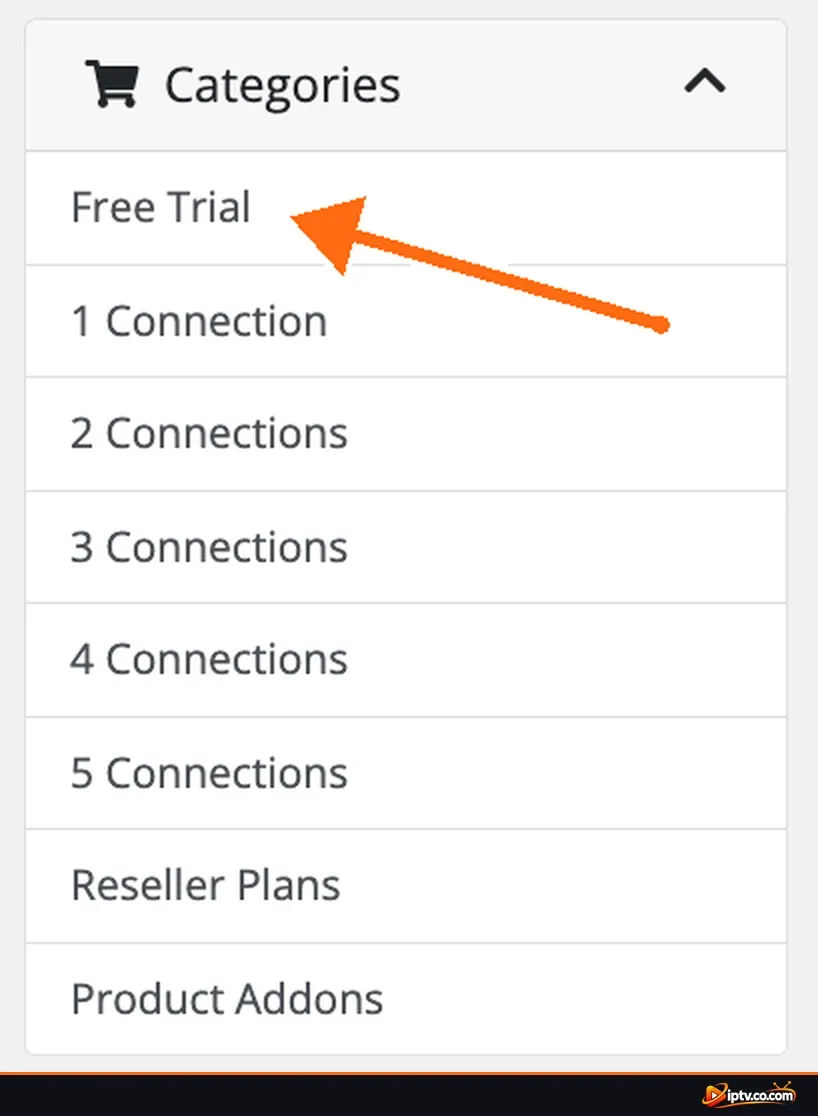
Step 1: Choose a Free Trial or a Plan
Open your IPTV provider’s website and go to the Store. Pick the Free Trial category to test the service, or choose a plan based on how many devices (connections) you want to use at the same time.
Step 2: Review Your Cart and Click Checkout
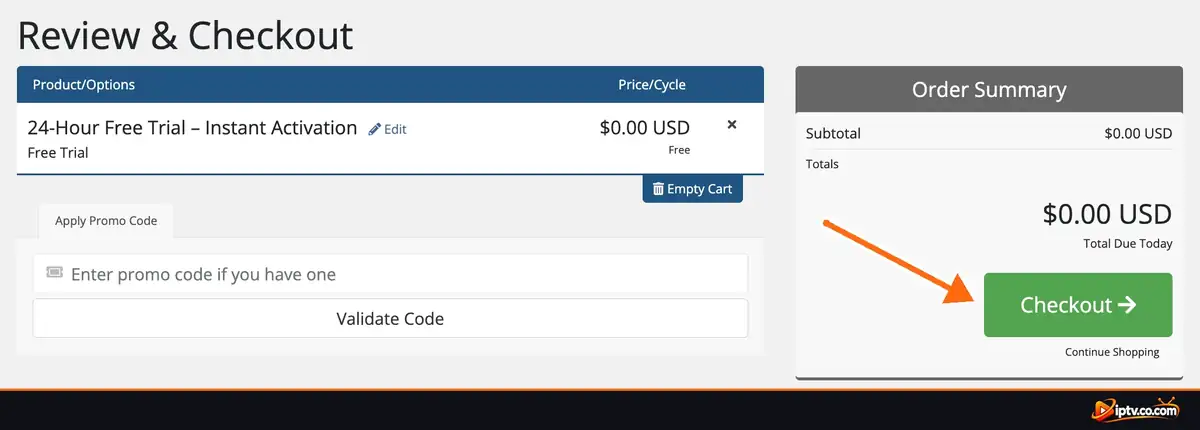
- Check that the right product is in your cart, for example 24-Hour Free Trial, Instant Activation.
- Confirm the price. A free trial shows $0.00 USD as the total due today.
- Enter a promo code if you have one (optional).
- Click Checkout.
Step 3: Create Your Account and Complete the Order
- Fill in your first name, last name, email address and phone number.
- Select your country.
- Create a strong password, or click Generate Password.
- Under Payment Details, a free trial shows No Payment Required.
- Choose whether to join the mailing list, then click Complete Order.

Step 4: Confirm Your Order
The Order Confirmation page appears with your order number. A confirmation email is sent to the address you entered. Keep the order number in case you need to contact support, then click Continue To Client Area.

Step 5: Open Your Active Service
In the client area dashboard, look at Your Active Products/Services. Your trial or plan is listed with a green Active label. Click View Details next to it.

Step 6: Copy Your M3U Playlist URL
Scroll down to the Manage tab. You will see all your connection details, each with its own Copy button:
- Xtream Code: Username, Password and server URL
- M3U Playlist URL: your full M3U link
- EPG Guide URL: the TV guide link
Click Copy next to M3U Playlist URL. That is your M3U link, ready to paste into any IPTV player.

Pro Tip
Save the Xtream Code details, the M3U URL and the EPG URL in a private note right away. A free trial usually lasts only 24 hours, so set up your app as soon as possible to test the channels.
Understanding Your M3U Playlist URL
Every M3U URL from an Xtream-based panel follows the same structure. Here is what each part means:
http://your-provider-url/get.php?username=YOUR_USERNAME&password=YOUR_PASSWORD&type=m3u_plus&output=ts| Part | What it means |
|---|---|
your-provider-url | The server address (sometimes with a port, like :8080) |
get.php | The script that builds your playlist |
username / password | Your personal account login |
type=m3u_plus | Playlist with channel names, logos and groups |
output=ts | Stream format (MPEG-TS). Change it to output=m3u8 (HLS) if channels do not play |
M3U URL vs Xtream Codes: Which One Should You Use?
Both come from the same account, so you can use either one. Pick the option your app supports best:
| Xtream Codes login | M3U playlist URL | |
|---|---|---|
| What you enter | Username, password and server URL | One single link |
| Live, Movies, Series | Separated automatically | Depends on the app |
| TV guide (EPG) | Usually loads automatically | Add the EPG URL manually |
| Best for | Apps with an Xtream Codes option | Apps that only accept a playlist link, like VLC |
Converting Xtream Codes to M3U: you can build the M3U link yourself by placing your server URL, username and password into the format shown above.
What Is the EPG Guide URL?
The EPG (Electronic Program Guide) URL gives your app the TV schedule for each channel. If your player has an EPG URL field, paste this link there:
http://your-provider-url/xmltv.php?username=YOUR_USERNAME&password=YOUR_PASSWORDHow to Add Your M3U URL to an IPTV Player
Menus differ a little from app to app, but the process is almost always the same:
- Open your IPTV player and go to Add Playlist (or Add User).
- Choose M3U URL or Playlist URL.
- Type a name for the playlist, for example “My IPTV”.
- Paste your M3U Playlist URL.
- Paste the EPG URL if the app has a field for it.
- Save and wait for the channels to load.
Some apps, such as IBO Player Pro, SET IPTV, Flix IPTV and Hot IPTV, ask you to add the playlist on their website using your device’s MAC address and device key. You can find step-by-step instructions for each app in our IPTV Apps guides and Setup Guides.
Keep Your M3U Link Private
Your M3U URL contains your username and password. Anyone who has it can use your connections, which can get your account blocked. Never post it in comments, forums or screenshots. If it leaks, ask your provider to reset your password.
M3U URL Not Working? Quick Fixes
- Check that the service is active. An expired trial or an unpaid plan stops the link from working.
- Copy the link again with the Copy button. One missing character or an extra space breaks the URL.
- Switch the output format. Change
output=tstooutput=m3u8, or the other way around. - Try the Xtream Codes login instead. It often loads faster than a large M3U playlist.
- Close other devices. Your plan allows a limited number of connections at the same time.
- Restart the app and your device, then check your internet connection.
Still stuck? See our IPTV troubleshooting guides.
Frequently Asked Questions
What is an M3U URL?
An M3U URL is a link to an M3U playlist file. IPTV apps use it to load the list of live channels, movies and series from your provider. The link includes your account username and password.
How do I get an M3U URL instantly?
Order a free trial or a plan from your IPTV provider, open your client area, click View Details on the active service and copy the M3U Playlist URL from the Manage tab.
Is M3U the same as M3U8?
They use the same playlist format. M3U8 is the UTF-8 version and is also used for HLS streams. Most IPTV players accept both.
Can I convert Xtream Codes to an M3U link?
Yes. Put your server URL, username and password into this format: http://server/get.php?username=USER&password=PASS&type=m3u_plus&output=ts
How do I add EPG to an M3U playlist?
Copy the EPG Guide URL from your client area and paste it into the EPG URL field of your IPTV app, then refresh the guide.
Which apps can play an M3U playlist?
Almost every IPTV player supports M3U, including IBO Player Pro, SET IPTV, Flix IPTV, Hot IPTV, BOB Player, DUPLEX, IPTV Smarters, TiviMate and VLC.
Is using an M3U playlist legal?
M3U is only a playlist format, so the file itself is legal. What matters is the content: use IPTV services that are licensed to stream the channels in your country.
That is all it takes to get an M3U URL instantly. Once you have the link, add it to your favorite IPTV player and start watching. Bookmark our Setup Guides for app-by-app installation and activation tutorials.