How to Activate SET IPTV With M3U and Xtream Codes
Activate SET IPTV step by step: add an M3U link or Xtream Codes on the SET IPTV website with your MAC, or add Xtream Codes manually in the app, then close and reopen.
By IPTV Guide
8 min read
2 Comments
Quick Summary
To activate SET IPTV with your playlist, note the MAC address shown in the app. On the SET IPTV website, choose M3U link or Xtream Codes, enter the MAC and your login details, then select Send to my TV and Confirm. Xtream Codes can also be added directly in the app with Add manually. SET IPTV has no Reload button: to load a new playlist, close the app and open it again.
Good to Know: SET IPTV Has No Channels
SET IPTV is a player only. It doesn’t provide or sell any channels, content or subscriptions. Your M3U link or Xtream Codes come from your IPTV provider.
After you install SET IPTV, the app is empty until you add your playlist. SET IPTV gives you two ways to do it: send your M3U link or Xtream Codes from the SET IPTV website using your TV’s MAC address, or type your Xtream Codes directly in the app. This guide shows both methods step by step, how to load the playlist on your TV and how to fix common problems.
Your IPTV login details from your provider: an M3U link or Xtream Codes (server URL, username and password).
A phone or computer with a browser, if you use the website method.
Step 1: Find Your SET IPTV MAC Address
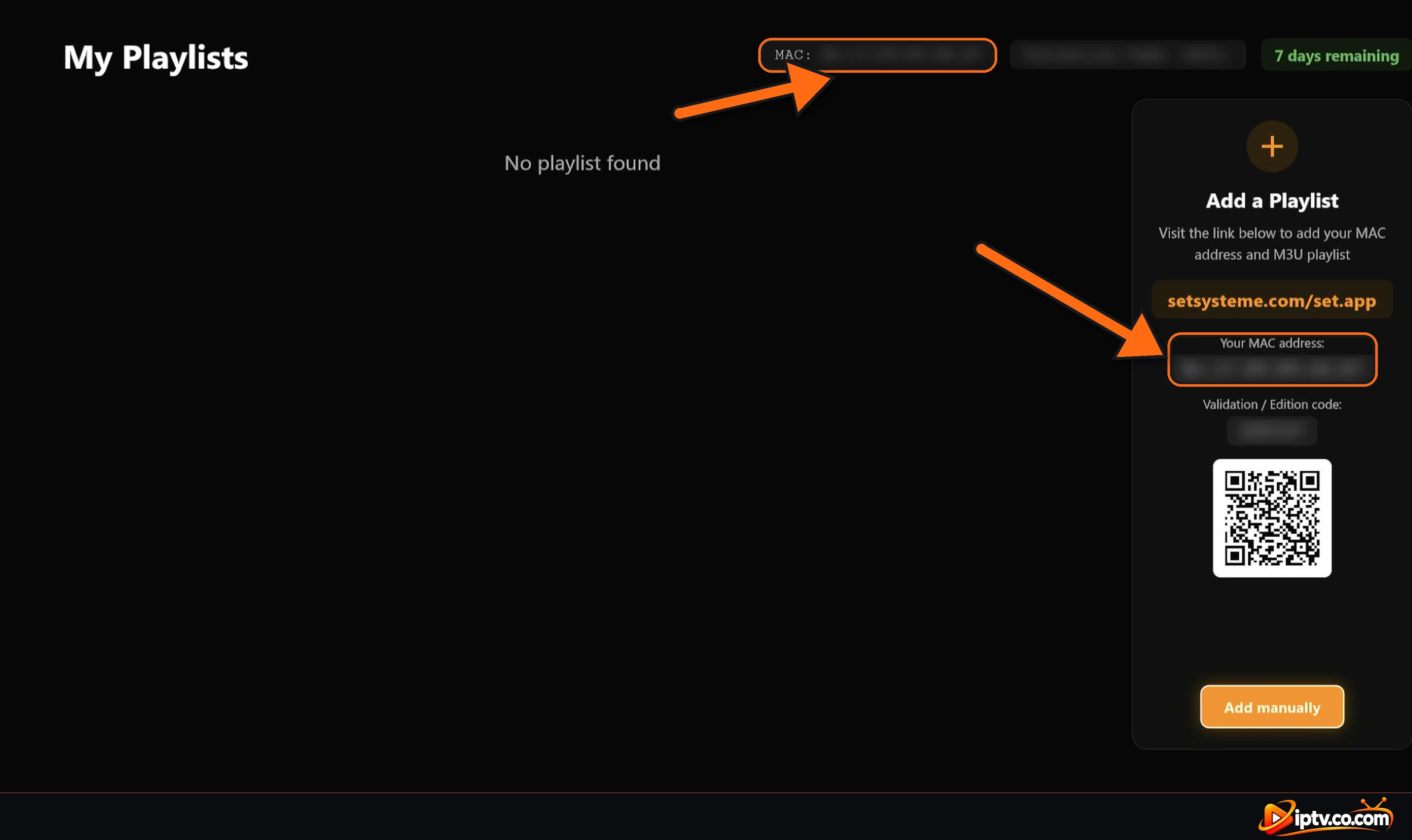
Open SET IPTV on your TV and go to the Playlists section (My Playlists). Your MAC address is shown in two places: at the top of the screen next to MAC:, and in the Add a Playlist panel under Your MAC address. The same panel shows your Validation / Edition code and how many days are left in your trial. Write the MAC down exactly as shown.
If you haven’t added a playlist yet, the screen shows No playlist found.
Find your MAC address in the SET IPTV Playlists section
Method 1: Add an M3U Link on the SET IPTV Website
On your phone or computer, open the SET IPTV website:
https://setsysteme.com/set.app
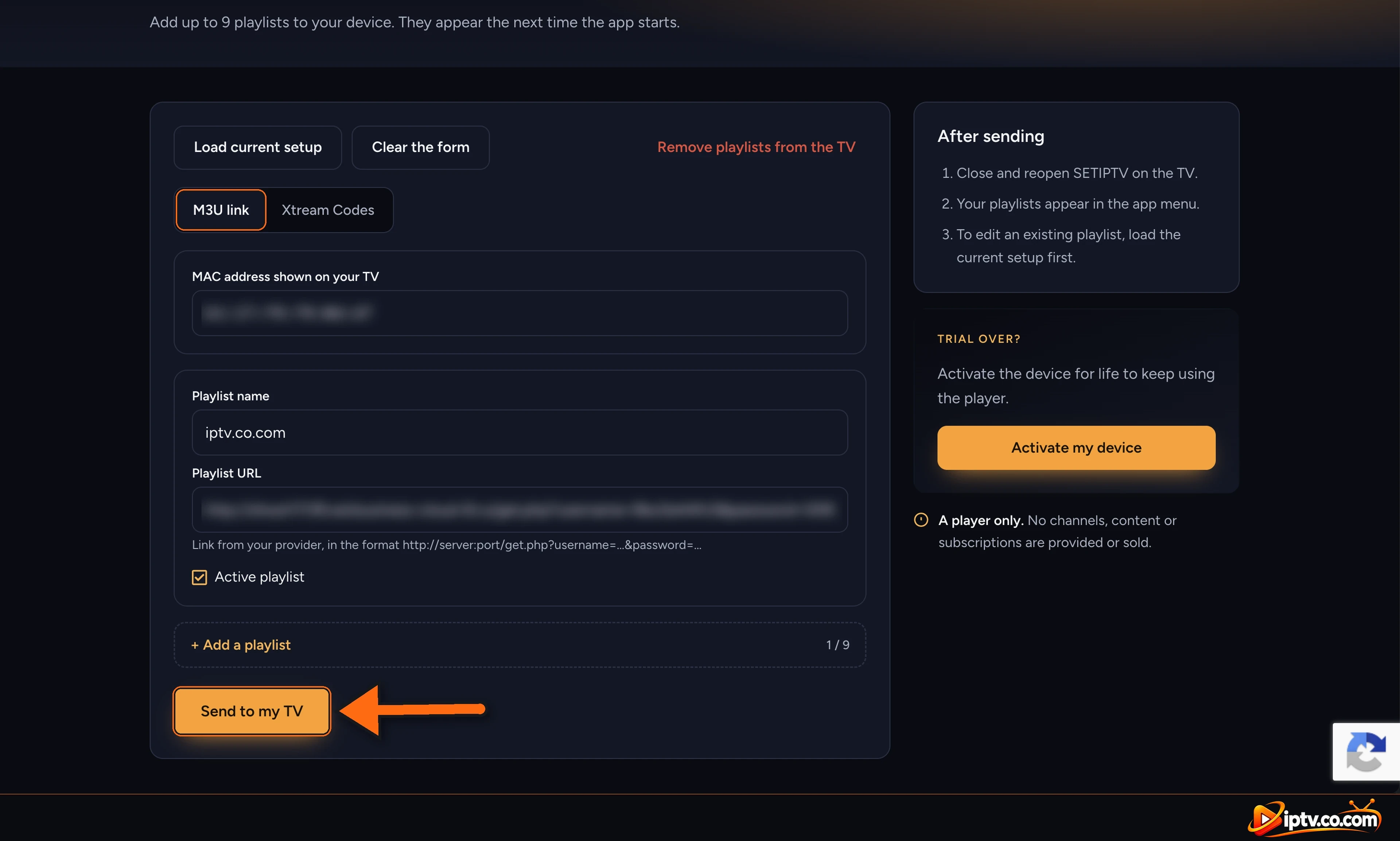
Select the M3U link tab.
MAC address shown on your TV: type the MAC from the app.
Playlist name: any name you like, for example My IPTV.
Playlist URL: paste the M3U link from your provider, in the format http://server:port/get.php?username=...&password=...
Keep Active playlist ticked.
Select Send to my TV.
Add an M3U link on the SET IPTV website and select Send to my TV
Confirm the Setup
A window asks Send the setup? Check the MAC address one more time, then select Confirm.
Check the MAC address and select Confirm to send the setup to SET IPTV
Done: Close and Reopen SET IPTV
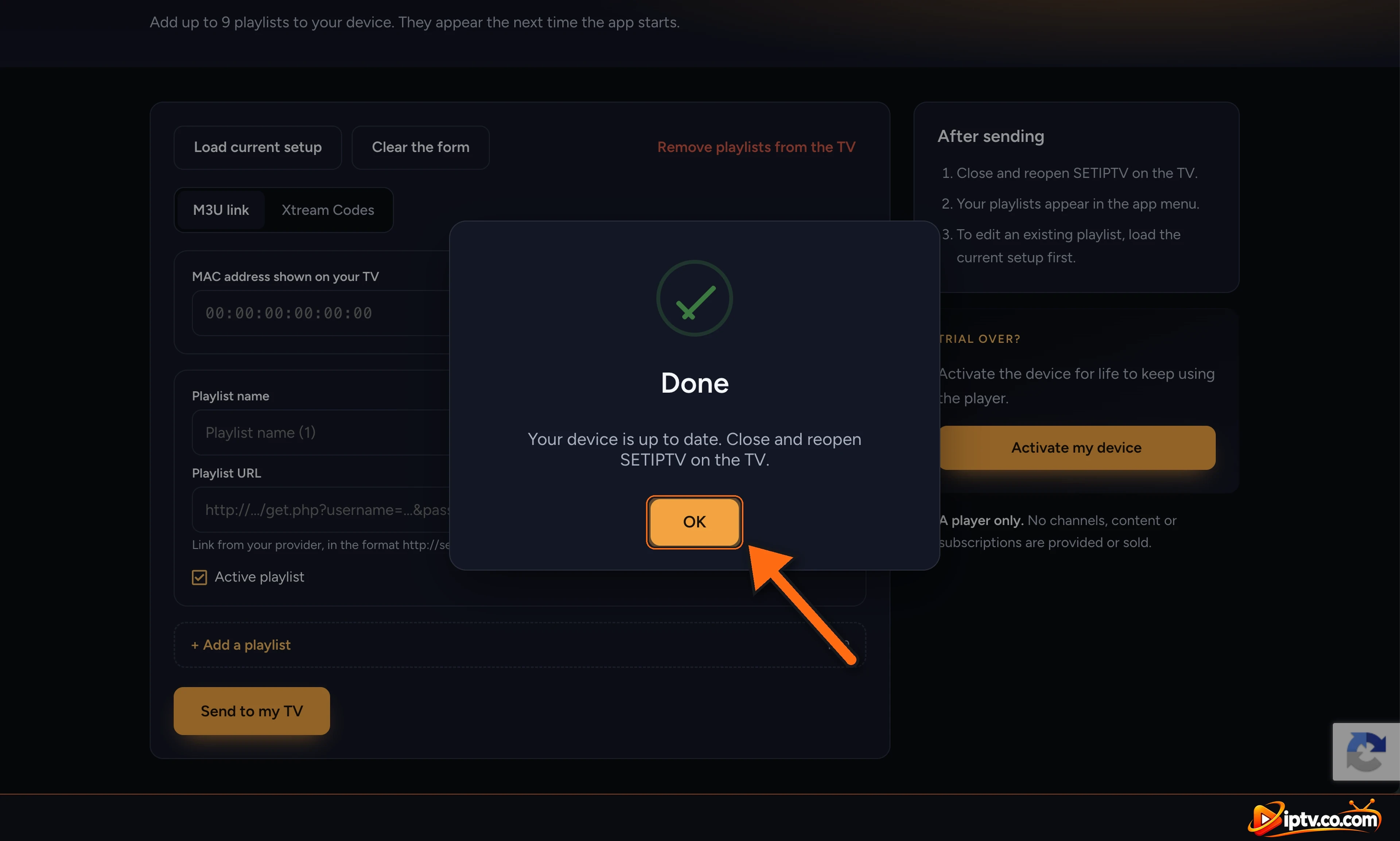
The website shows Done: Your device is up to date. Select OK, then close and reopen SET IPTV on your TV to load the playlist.
Done: your SET IPTV device is up to date, close and reopen the app
Close and Reopen SET IPTV to Load the Playlist
SET IPTV has no Reload button. After sending your playlist from the website, leave the app and open it again: press Back or Home on your remote to exit, then open SET IPTV. On Firestick or Android TV, if the playlist still doesn’t appear, force-close the app in Settings > Applications and open it again.
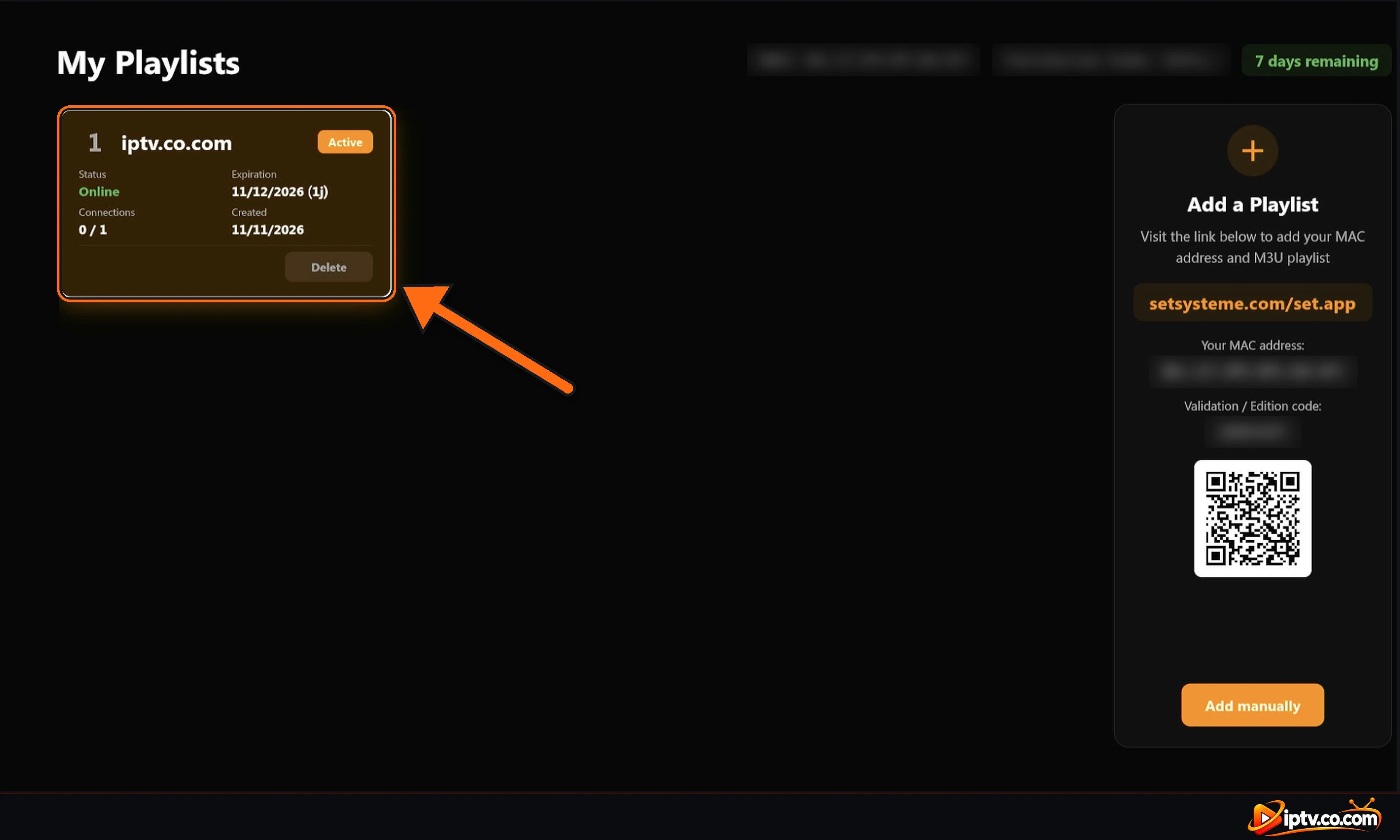
Your playlist now appears on the My Playlists screen with the status Online, its expiration date and the number of connections. Select it to open it.
The playlist appears in SET IPTV My Playlists: status Online and Active
Watch Live TV, Movies and Series
Use the menu on the left of the home screen to open Live TV, Movies, Series, Search and Settings.
Live TV
Choose a category on the left and a channel on the right. Long press OK on a channel for more options, such as adding it to favorites.
SET IPTV Live TV: categories on the left and channels on the right
Movies
The Movies screen shows Recent Movies and Top 10 Movies. Open the categories list to browse your provider’s movie categories.
SET IPTV Movies home with Recent Movies and Top 10
SET IPTV movie categories: Top 10, Recently Added and your provider categories
Series
Series work the same way: choose a category, then a series, a season and an episode.
SET IPTV series categories
Add Up to 9 Playlists
Select + Add a playlist on the website to add more playlists to the same device (up to 9). To change a playlist you already sent, select Load current setup first, edit it, then send it again.
Method 2: Add Xtream Codes on the SET IPTV Website
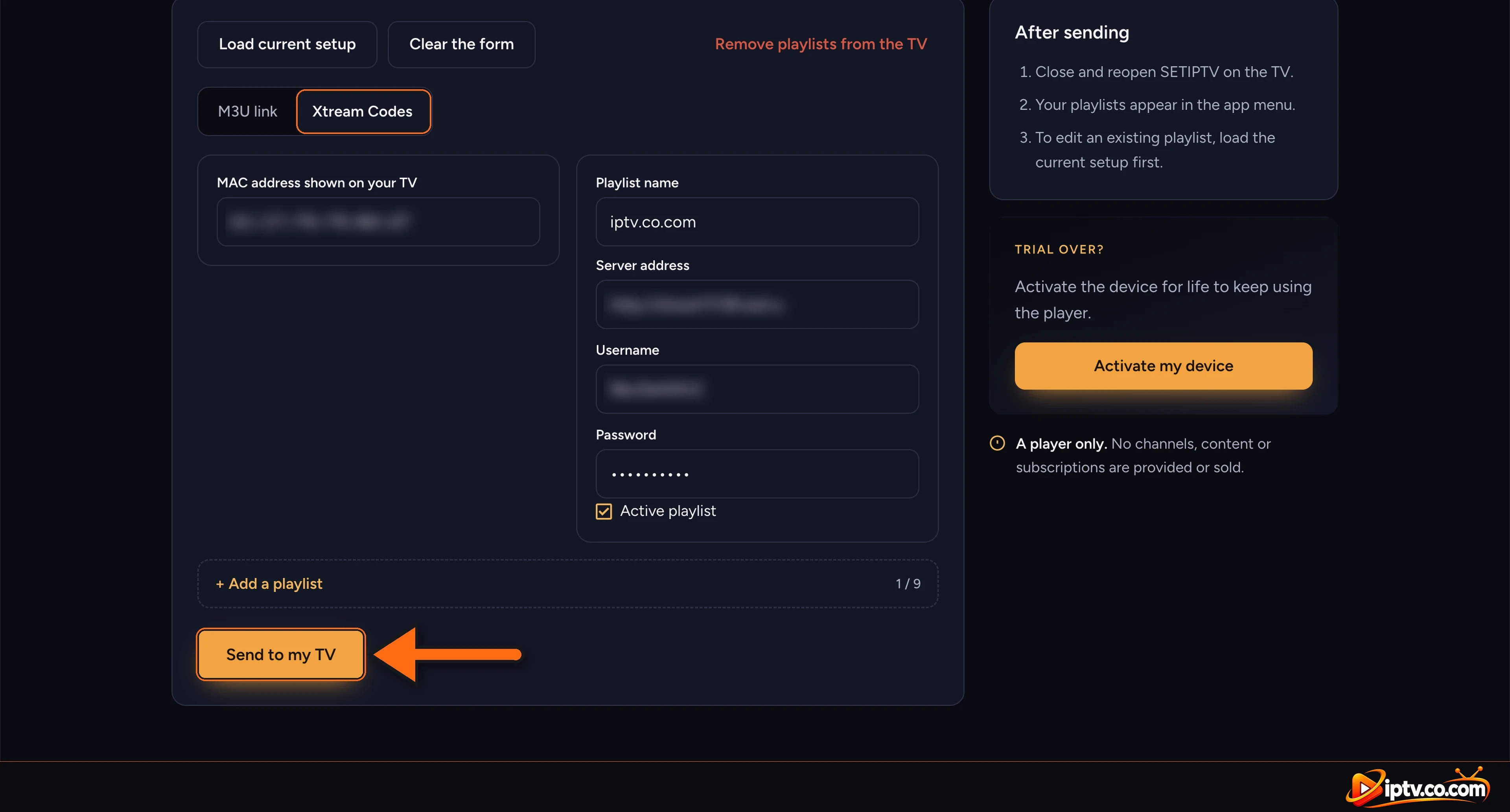
On the SET IPTV website, select the Xtream Codes tab.
MAC address shown on your TV: type the MAC from the app.
Playlist name: any name you like.
Server address: the server URL from your provider, for example http://example-server.com, without username or password.
Username and Password: exactly as your provider sent them.
Keep Active playlist ticked, select Send to my TV, then Confirm.
Add Xtream Codes on the SET IPTV website: server address, username, password and Send to my TV
Method 3: Add Xtream Codes Manually in the SET IPTV App
Don’t want to use a phone or computer? You can type your Xtream Codes directly on the TV:
Open the Playlists section and select Add manually.
In Add a Playlist, use the on-screen keyboard to fill in Name, Host (URL), Username and Password. The http:// key saves typing.
Select Add.
Select Add manually in the SET IPTV Playlists section
Add Xtream Codes manually in the SET IPTV app: name, host, username, password and Add
SET IPTV Free Trial and Activation
SET IPTV gives each device a 7-day free trial. The days left are shown at the top of the My Playlists screen. When the trial ends, select Activate my device on the SET IPTV website and activate the device with the same MAC address to keep using the player. Your IPTV provider can also activate it for free with a 6 or 12-month subscription: see the SET IPTV subscription guide.
SET IPTV Playlist Not Showing? Quick Fixes
Playlist doesn’t appear: close SET IPTV completely and open it again. There is no Reload button.
Wrong MAC: compare the MAC on the website with the MAC in the app, character by character. Use the colons.
Status not Online or no channels: check your username, password and server with your provider, and that your subscription is active.
Use http://, not https:// in the M3U link and the server address.
Xtream Codes don’t work: put only the server URL in Server address, not the full M3U link.
Connections 1 / 1: your login is already used on another device. Close it there first.
Trial ended: activate your device on the SET IPTV website.
Using a VPN? Use Your Provider’s VPN DNS
If SET IPTV stops working with a VPN, replace the server with your provider’s VPN DNS. It always comes with your IPTV login details and always starts with vpn. If your provider didn’t send one, contact them.
Note the MAC address in the app, open the SET IPTV website, choose M3U link or Xtream Codes, enter the MAC and your login details, select Send to my TV and Confirm, then close and reopen the app.






2 Responses