IBO Player Not Working? Easy Fixes for Every Problem
IBO Player or IBO Player Pro not working? Fix movies and series not playing, loading problems, playlist errors, user not found, EPG and Samsung or Firestick issues.
By IPTV Guide
11 min read
0 Comments
Quick Summary
Most IBO Player problems are fixed in a minute: movies and series not playing? Go to Settings > More Options, enable Use Runtime Function In Movies Section (and Series) and select Save. Not loading or no channels? Select Refresh, check your internet, and check your playlist on the IBO Player website. App stopped after 7 days? The free trial ended and the device needs to be activated.
Good to Know: IBO Player Has No Channels of Its Own
IBO Player is only a player. It doesn’t provide any IPTV channels, playlists or subscriptions, so if your channels stop working, the problem is often your playlist or your IPTV provider, not the app. Fixing the app settings below solves the rest.
IBO Player and IBO Player Pro usually work without problems, but movies that won’t start, a playlist that won’t load or a “user not found” message can happen on any device. This guide lists the most common IBO Player problems on Samsung and LG TVs, Firestick, Android TV, phones and PC, with the exact fix for each one. Haven’t set it up yet? See how to activate IBO Player.
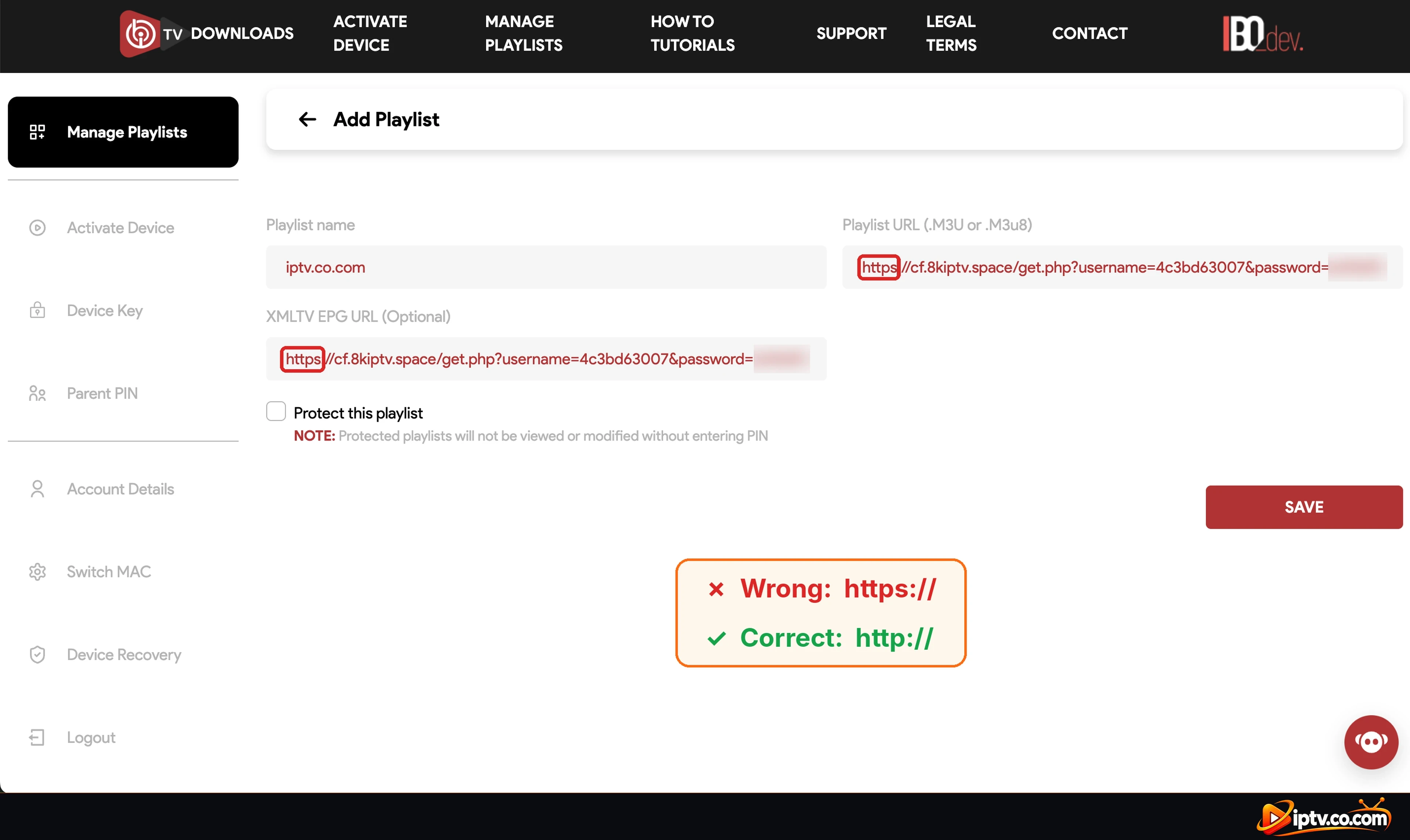
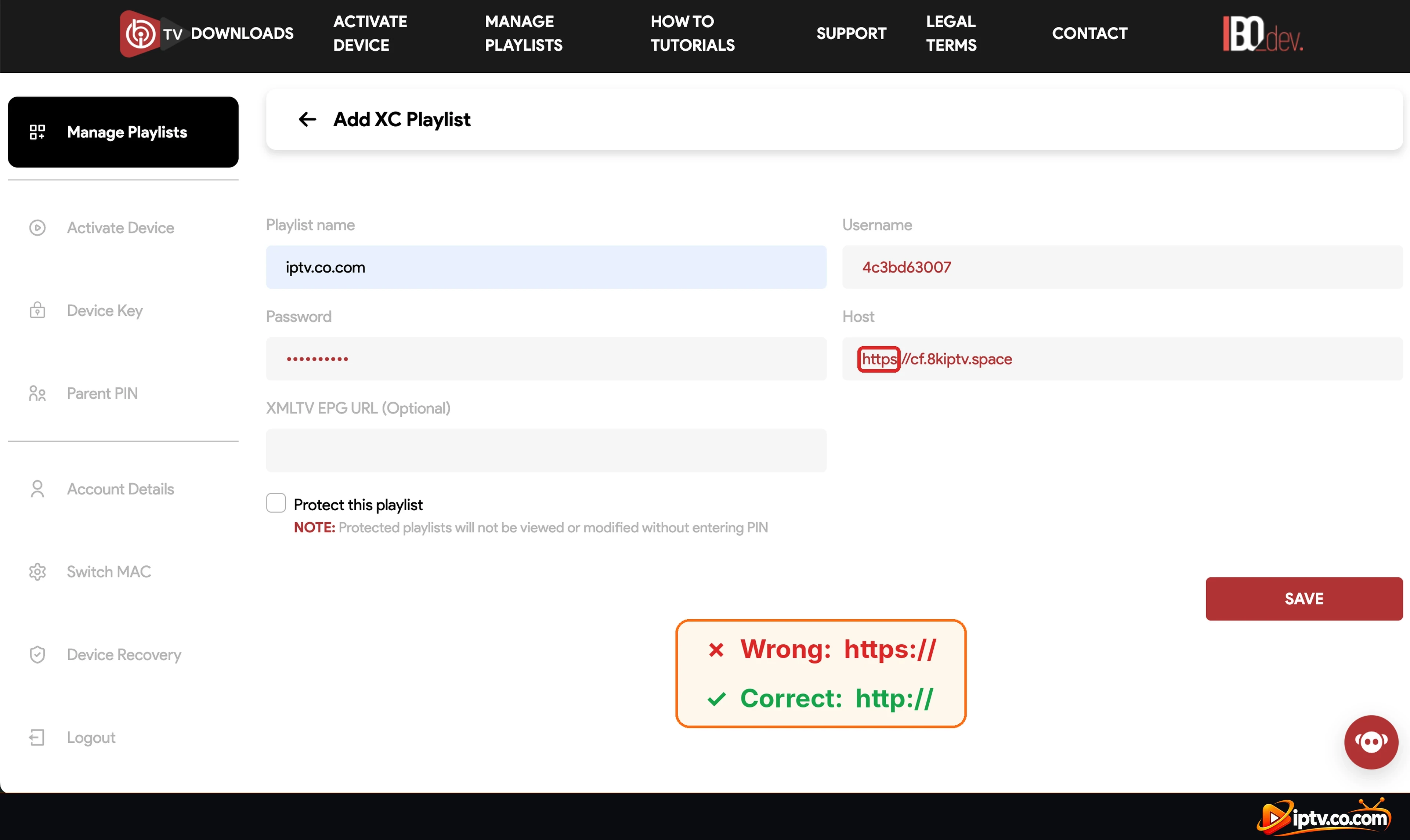
Playlist Not Working Because the URL Starts With https://
A very common mistake: the Playlist URL, the XMLTV EPG URL or the Xtream Codes Host starts with https://. Most IPTV servers only work with http://, so IBO Player can’t load the channels.
Log in on the IBO Player website with your Device ID and Device Key and open Manage Playlists.
Edit your playlist and change https:// to http:// at the start of the Playlist URL, the EPG URL or the Host (just remove the s).
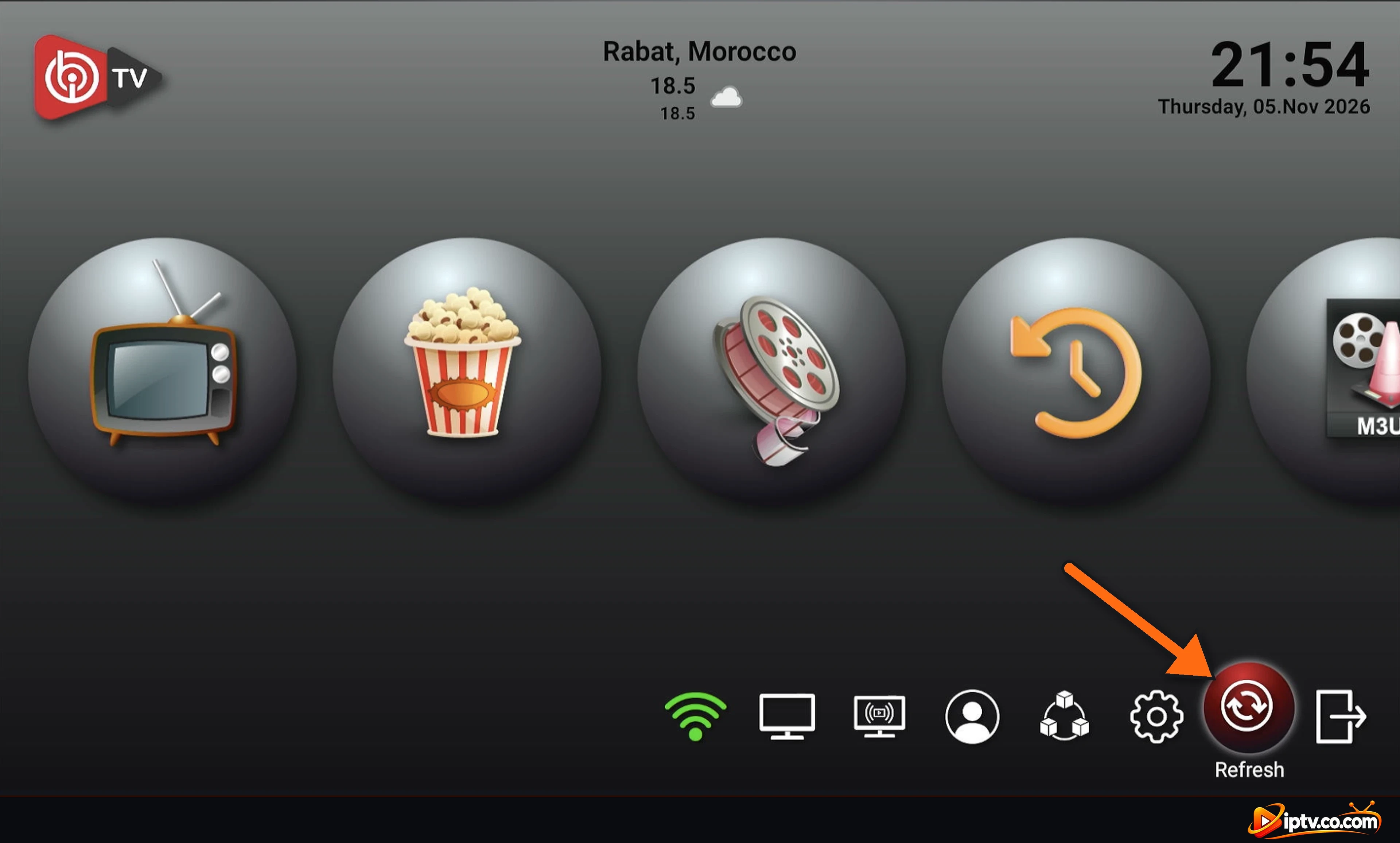
Click SAVE, then select Refresh on the IBO Player home screen.
Tip: browsers and some phones add https:// automatically when you copy a link. Always check the start of the URL before you click Save.
M3U: the Playlist URL and EPG URL must start with http://, not https://
Xtream Codes: the Host must start with http://, not https://
Quick Checklist: Try These First
Check that your internet works on another app (YouTube, Netflix).
Restart your internet to get a new IP address: unplug your router or modem for 1 minute, plug it back in and wait until the internet is back. (On mobile data, turn airplane mode on and off.)
On the IBO Player home screen, select Refresh, or close and reopen the app.
Restart your TV, Firestick or box (unplug it for 30 seconds).
Check that your IPTV subscription is still active with your provider.
Make sure IBO Player is updated: Settings > Check For Updates.
Select Refresh on the IBO Player home screen
Movies and Series Not Working in IBO Player
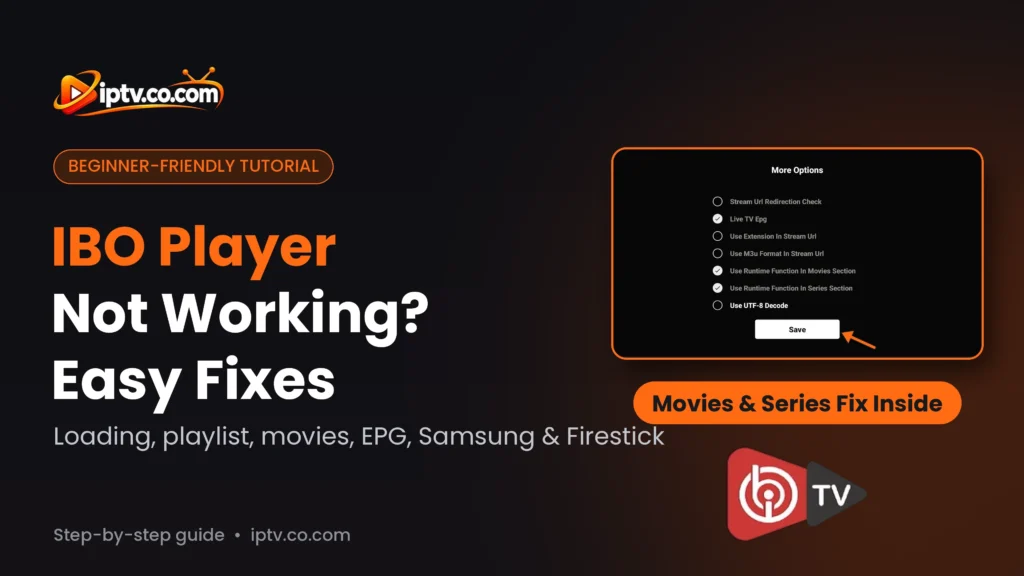
If Live TV works but movies or series won’t start, show a black screen or stop after a few seconds, enable the runtime function:
On the IBO Player home screen, open Settings (gear icon).
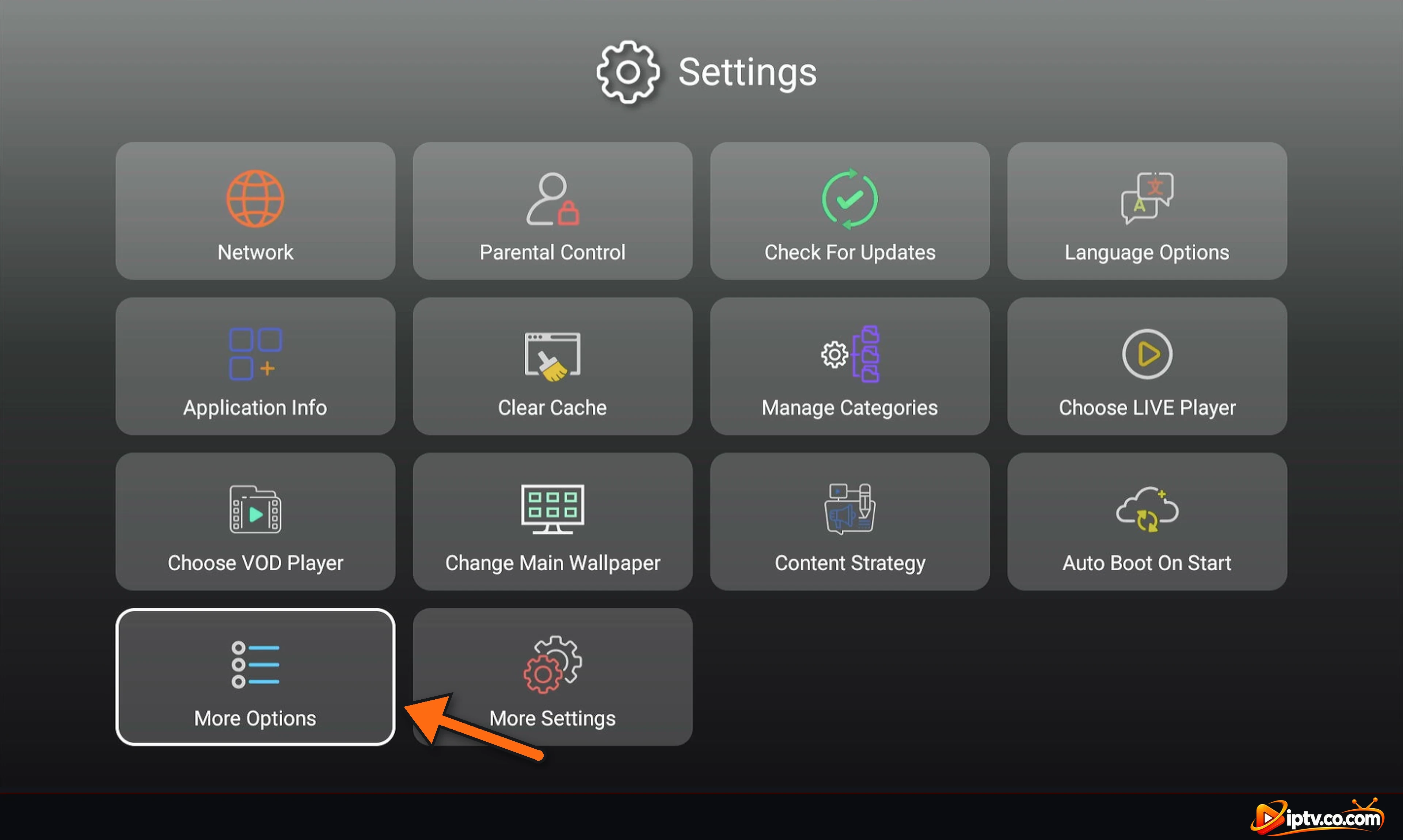
Select More Options.
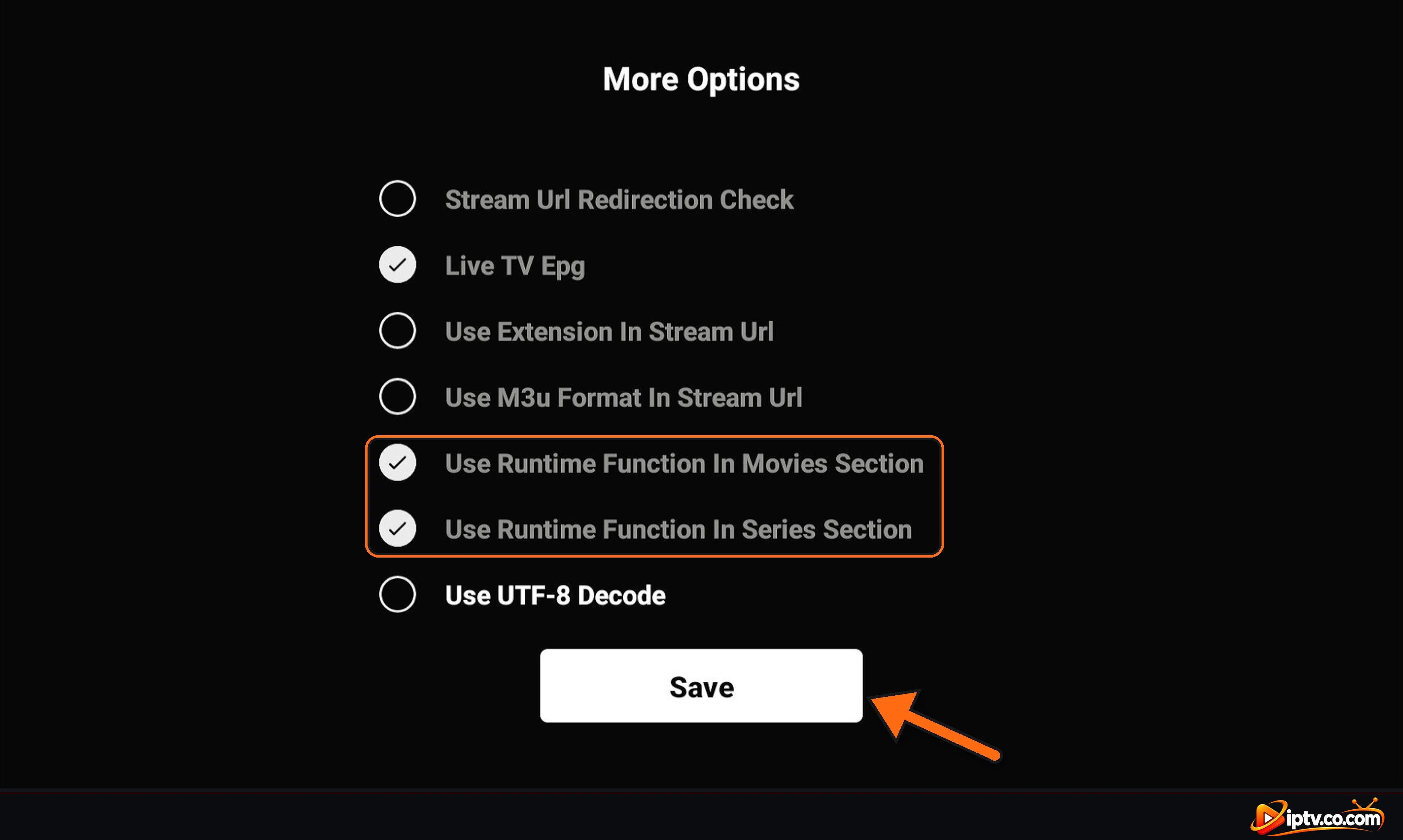
Enable Use Runtime Function In Movies Section, and also Use Runtime Function In Series Section.
Select Save.
After that, the movies and series should work. If they still don’t, select Refresh on the home screen and try another title.
Step 1: Open Settings and Select More Options
Open Settings, then More Options
Step 2: Enable Use Runtime Function and Select Save
Enable Use Runtime Function In Movies Section and Series Section, then select Save
IBO Player Not Loading or Stuck on Loading
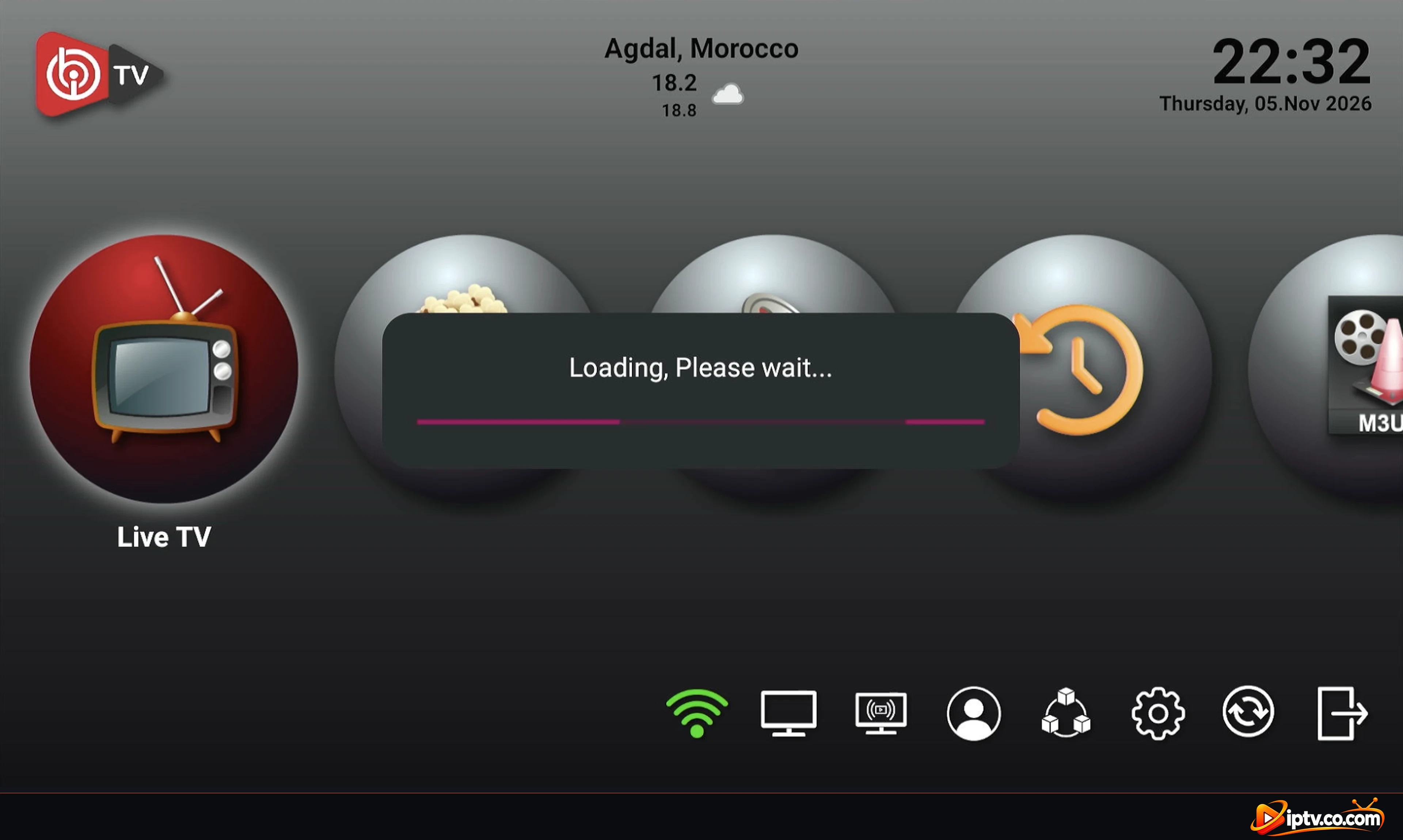
Refresh the playlist: select Refresh on the home screen and wait for Loading, Please wait… to finish. Big playlists can take a minute.
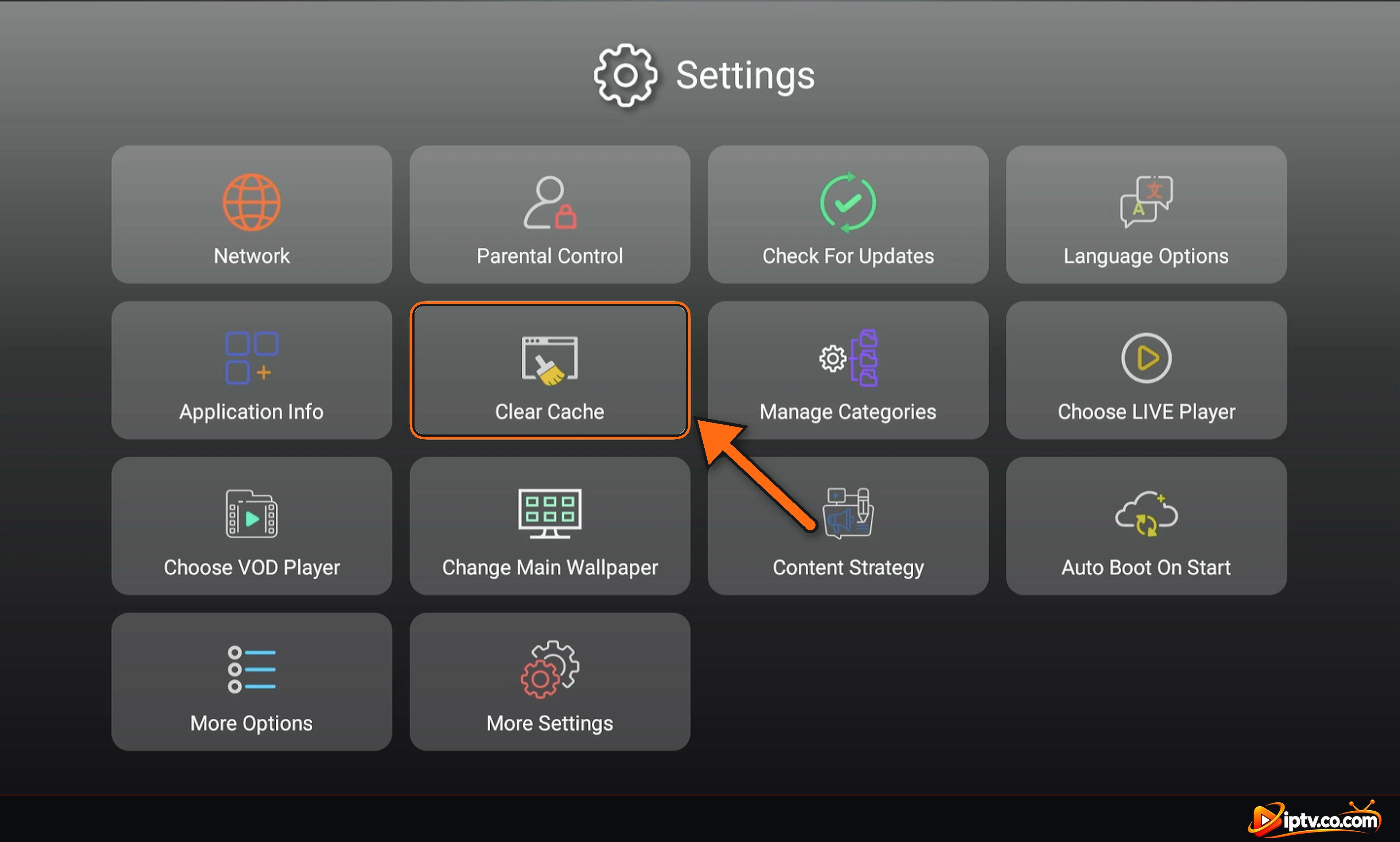
Clear the cache: go to Settings > Clear Cache, then reopen the app.
Restart the device and your router.
Reinstall IBO Player: your playlist is saved on the IBO Player website with your Device ID, so it comes back after reinstalling. See how to download IBO Player.
IBO Player Pro not loading: the same steps apply; also check that you added your playlist on the website shown in the Pro app, not on another IBO site.
IBO Player loading the playlist
IBO Player Playlist Not Working or No Channels
Check the playlist on the website: log in on the IBO Player website with your Device ID and Device Key and open Manage Playlists. If the list is empty, add your playlist again (see how to activate IBO Player).
Check your login details: one wrong letter in the Xtream Codes username, password or host, or a cut M3U URL, is enough to break it. Copy them again from your provider’s email.
Host format: the Xtream Codes host must start with http:// (not https://) and include the port if your provider gave one. See URL starts with https://.
Try the other method: if Xtream Codes doesn’t work, add the same subscription as an M3U URL, or the other way round.
Clear the cache:Settings > Clear Cache > Yes, then reopen the app (steps below).
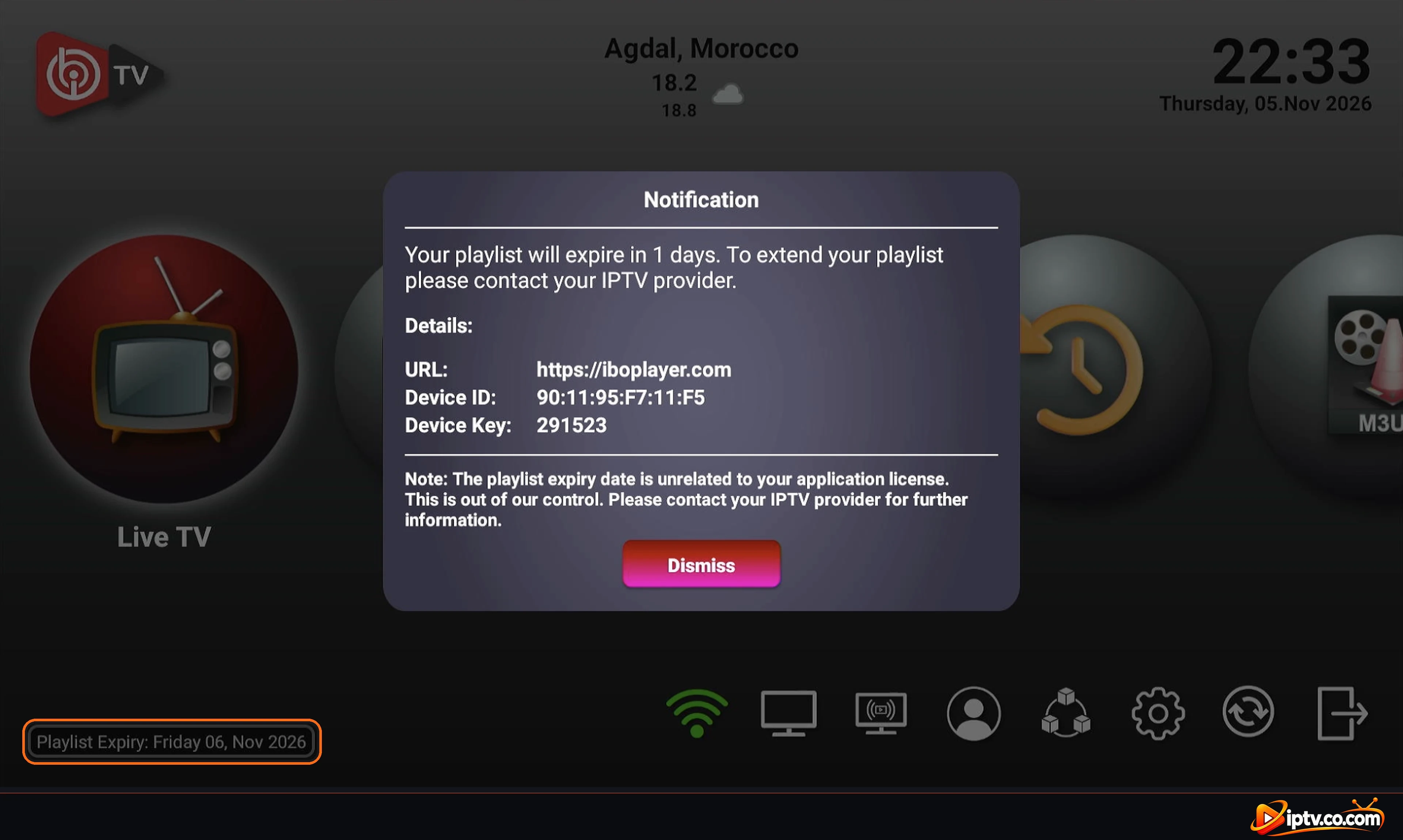
Subscription expired: if IBO Player shows Your playlist will expire or the channels stopped on a date, contact your IPTV provider to renew it. This date isn’t the app license. You can check the playlist expiry date at the bottom left of the IBO Player home screen.
You can check the playlist expiry date from here
Clear the IBO Player Cache
Old data saved in the app can stop a playlist from loading, even when your login is correct. Clear the cache:
On the IBO Player home screen, open Settings (gear icon).
Select Clear Cache.
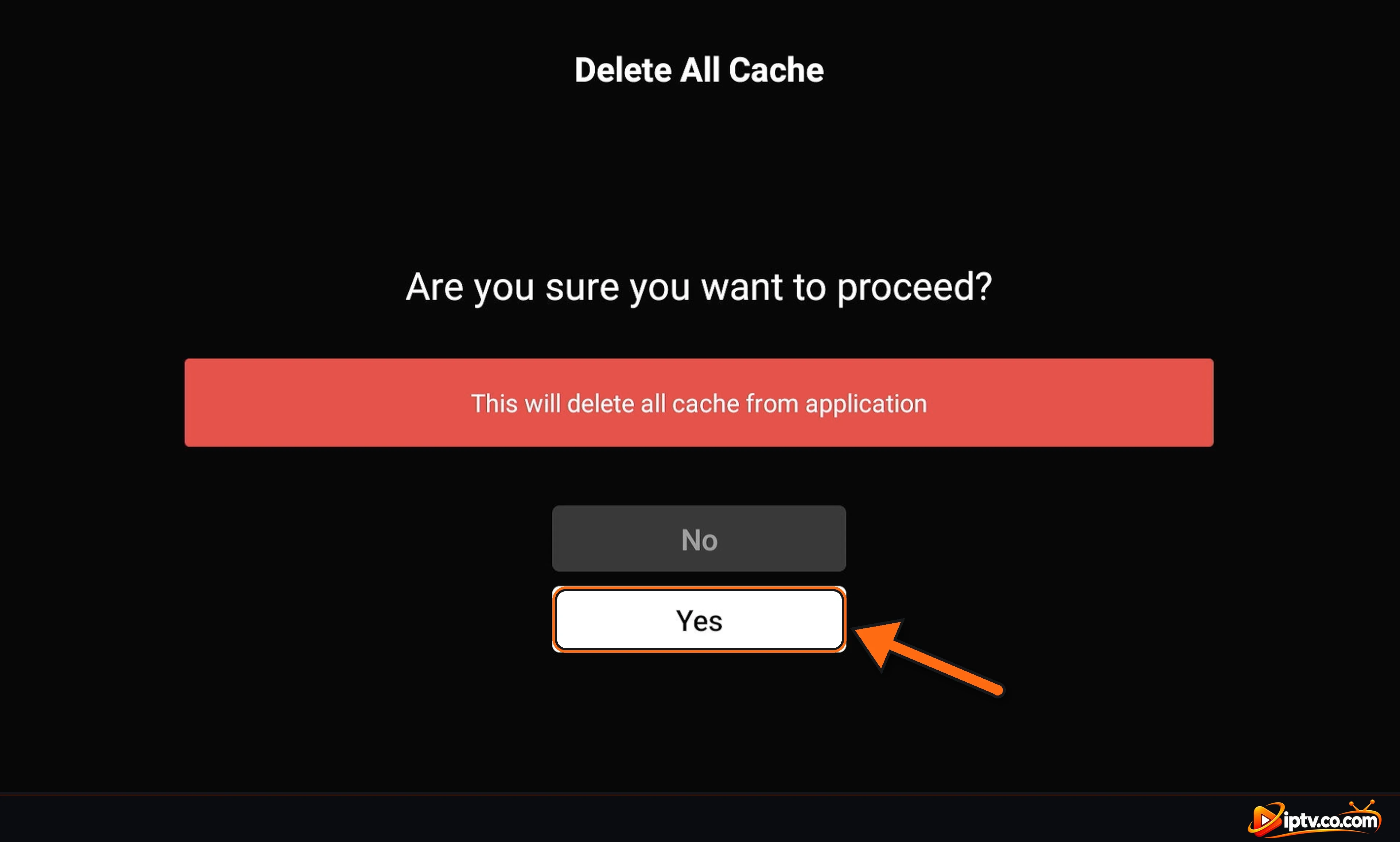
On Delete All Cache, select Yes.
Close and reopen IBO Player, then select Refresh. Your playlist reloads from the IBO Player website.
Open Settings and select Clear Cache
Select Yes to delete all cache
“User Not Found” or Can’t Log In on the IBO Player Website
This message usually means the website can’t match the Device ID and Device Key you typed:
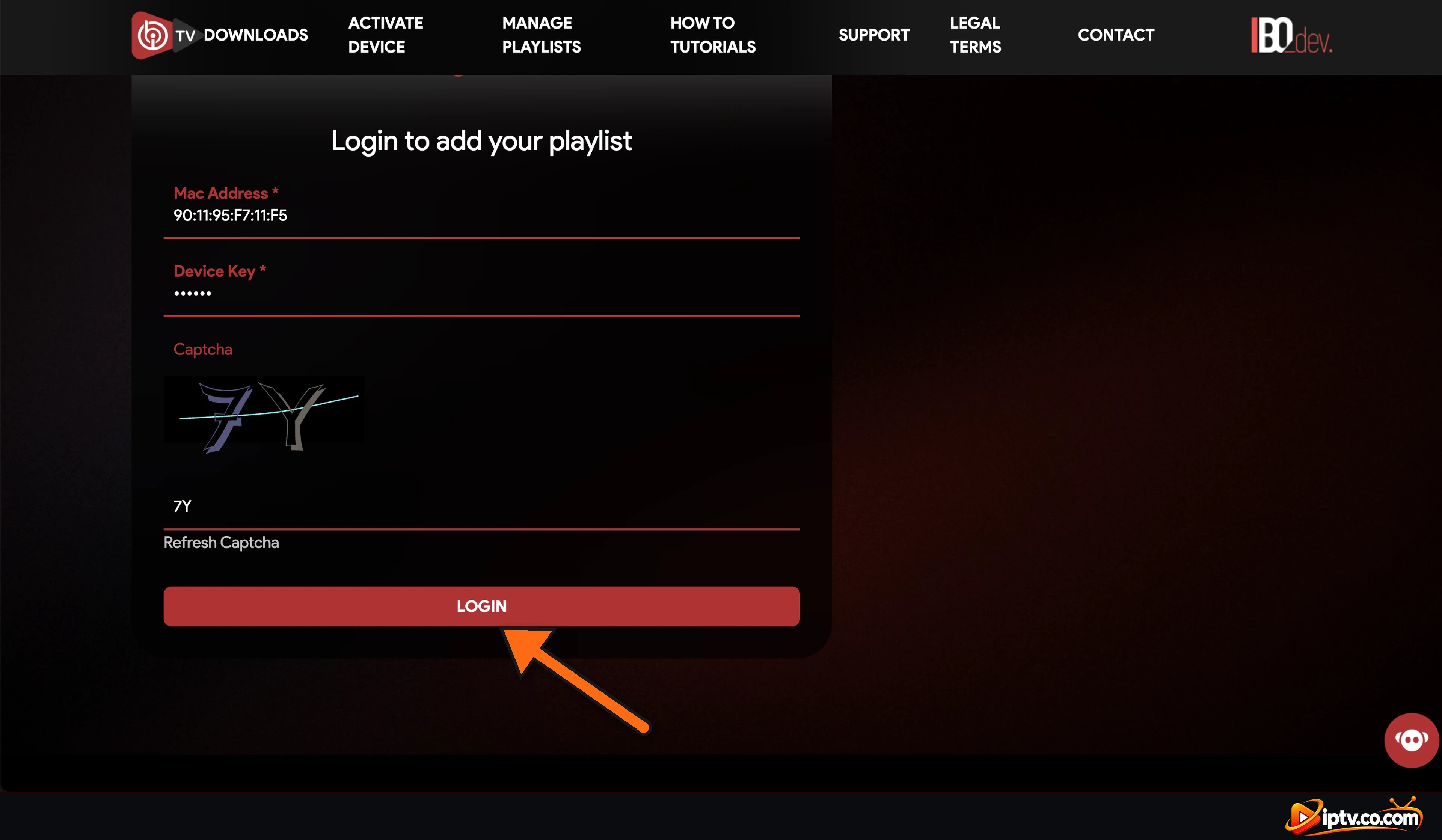
Type the MAC address exactly as shown in the app, with the colons (for example 90:11:95:F7:11:F5).
Check the Device Key again: 0 and O, or 1 and I, look alike.
Open the app first so the device is registered, then try again.
IBO Player Pro: make sure you log in on the website shown on the IBO Player Pro welcome screen; IBO Player and IBO Player Pro use different apps.
Click Refresh Captcha and type the new characters.
Enter the MAC address and Device Key exactly as shown in the app
IBO Player Stopped Working After 7 Days (Trial Expired)
Every new device gets a 7-day free trial. When it ends, IBO Player stops playing until the device is activated. Most IPTV providers activate IBO Player for free when you buy a 6- or 12-month subscription: contact your provider with your Device ID. Otherwise, buy the license on the official website (see how to buy the IBO Player license). Prices and renewal: IBO Player subscription explained.
IBO Player EPG (TV Guide) Not Working
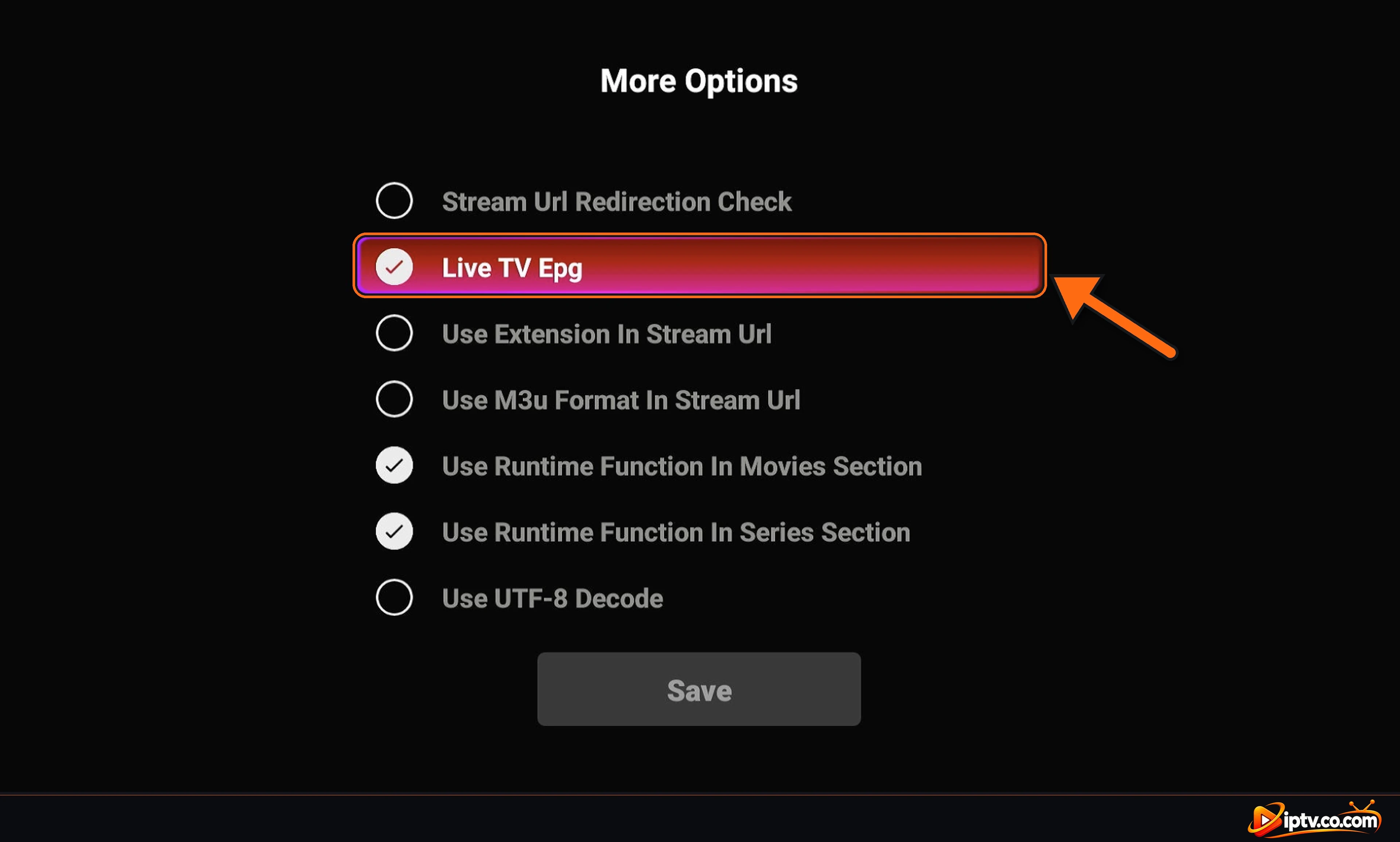
Check that Live TV Epg is selected: open Settings > More Options, select Live TV Epg so it’s ticked, and select Save (see the screenshots below).
With an M3U playlist, add your provider’s XMLTV EPG URL to the playlist on the IBO Player website.
Select Refresh on the home screen and wait a few minutes: the guide downloads after the channels.
Some channels have no guide data at all. If only a few channels are empty, it’s the provider’s EPG, not the app.
Open Settings, then More Options
Check that Live TV Epg is selected, then select Save
IBO Player Buffering or Freezing
Use a cable instead of Wi-Fi, or move the router closer. HD needs about 10 Mbps, 4K about 25 Mbps.
Change the player: Settings > Choose LIVE Player (Live TV) or Choose VOD Player (movies and series).
Clear the cache in Settings > Clear Cache and restart the device.
If only some channels freeze, the problem is on the provider’s server: contact your IPTV provider.
IBO Player Not Working on Samsung or LG TV
Update the TV software: Settings > Support > Software Update (Samsung) or Settings > General > About This TV (LG).
Clear the app cache in IBO Player Settings > Clear Cache, then turn the TV off at the wall for 1 minute.
Delete IBO Player and install it again from Samsung Apps or LG Content Store. Your playlist stays on the website.
If IBO Player isn’t available for your model, try IBO Player Pro, or plug in a Firestick (see how to download IBO Player).
IBO Player Pro Not Working on Firestick
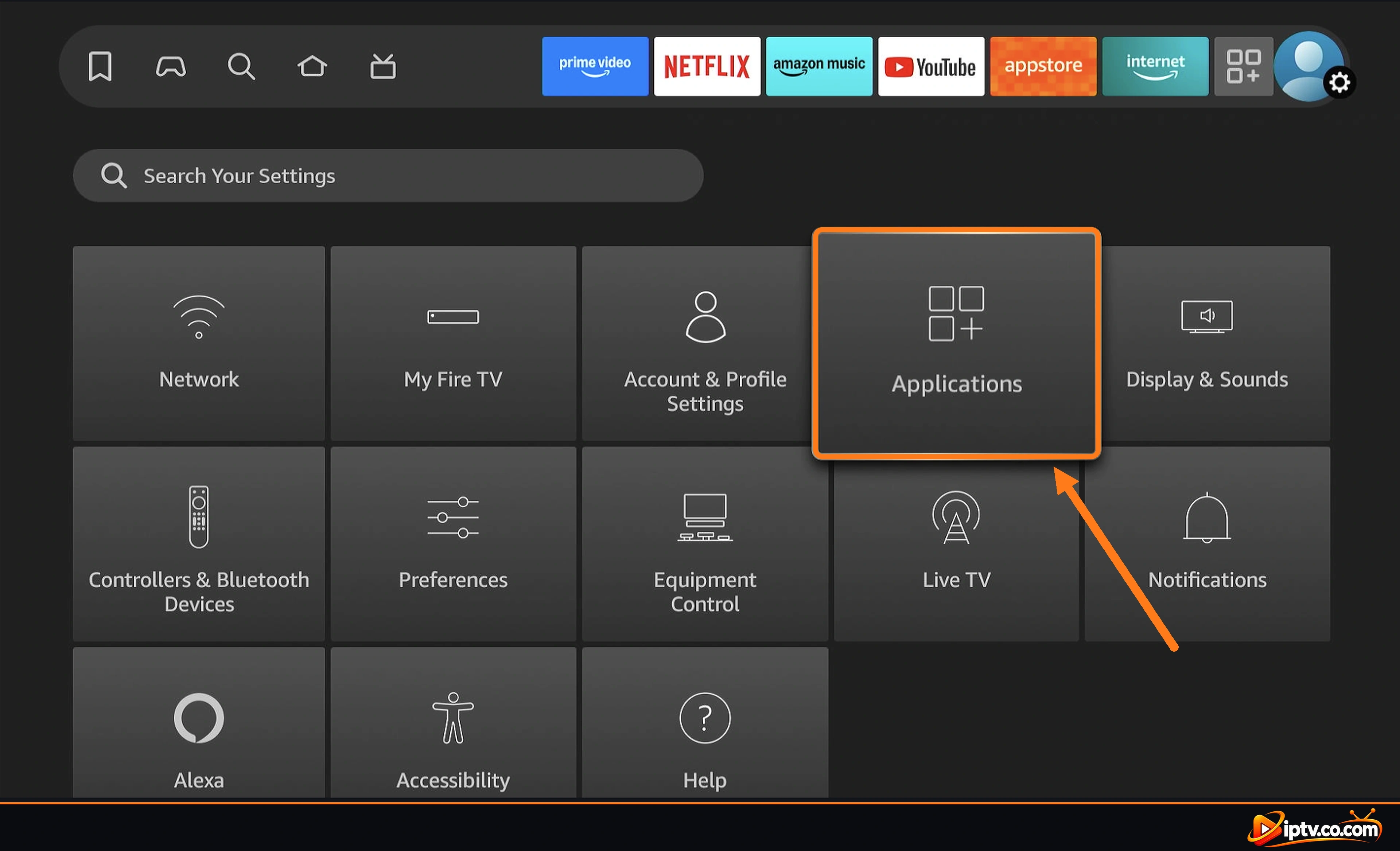
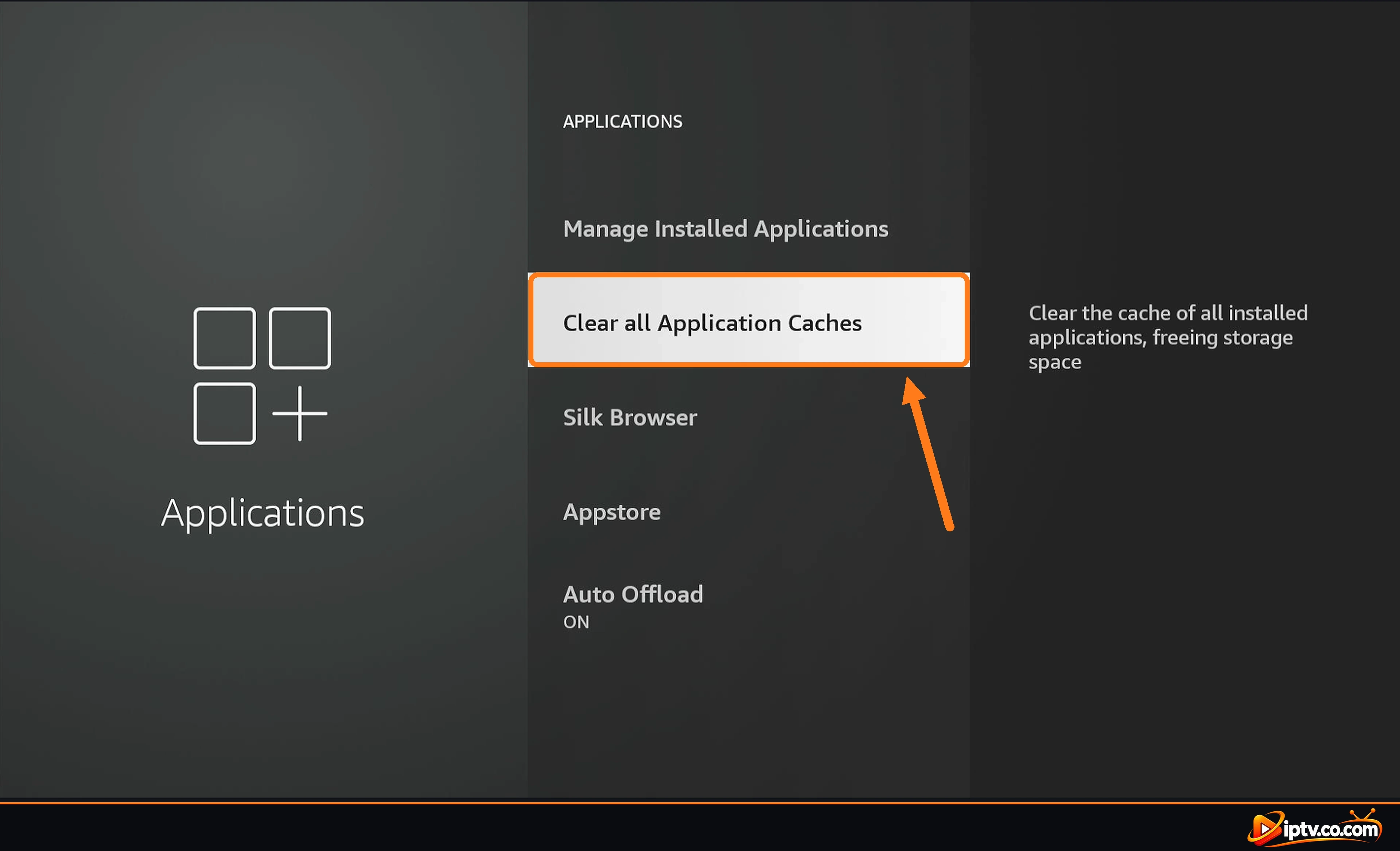
Clear the cache: on the Fire TV home screen open Settings > Applications and select Clear all Application Caches (screenshots below). To clear only IBO Player, go to Manage Installed Applications > IBO Player > Clear cache, then Clear data. Your playlist stays saved on the IBO Player website.
Free up storage: uninstall apps you don’t use and delete old APK files in Downloader.
Restart the Firestick: hold Select + Play for 5 seconds.
Open Settings > Applications on your Fire TV
Select Clear all Application Caches
Keep Your Login Private
Never post your Device Key, Xtream Codes or M3U link in comments or support groups when asking for help. Anyone with them can use your playlist.
Still Not Working? Uninstall IBO Player and Install It Again
If nothing above fixes it, a clean reinstall usually does. Your playlist is saved on the IBO Player website with your Device ID, so you don’t lose it.
Step 1: Open Settings > Applications
On the Fire TV home screen, open Settings (gear icon) and select Applications.
Open Settings > Applications on your Fire TV
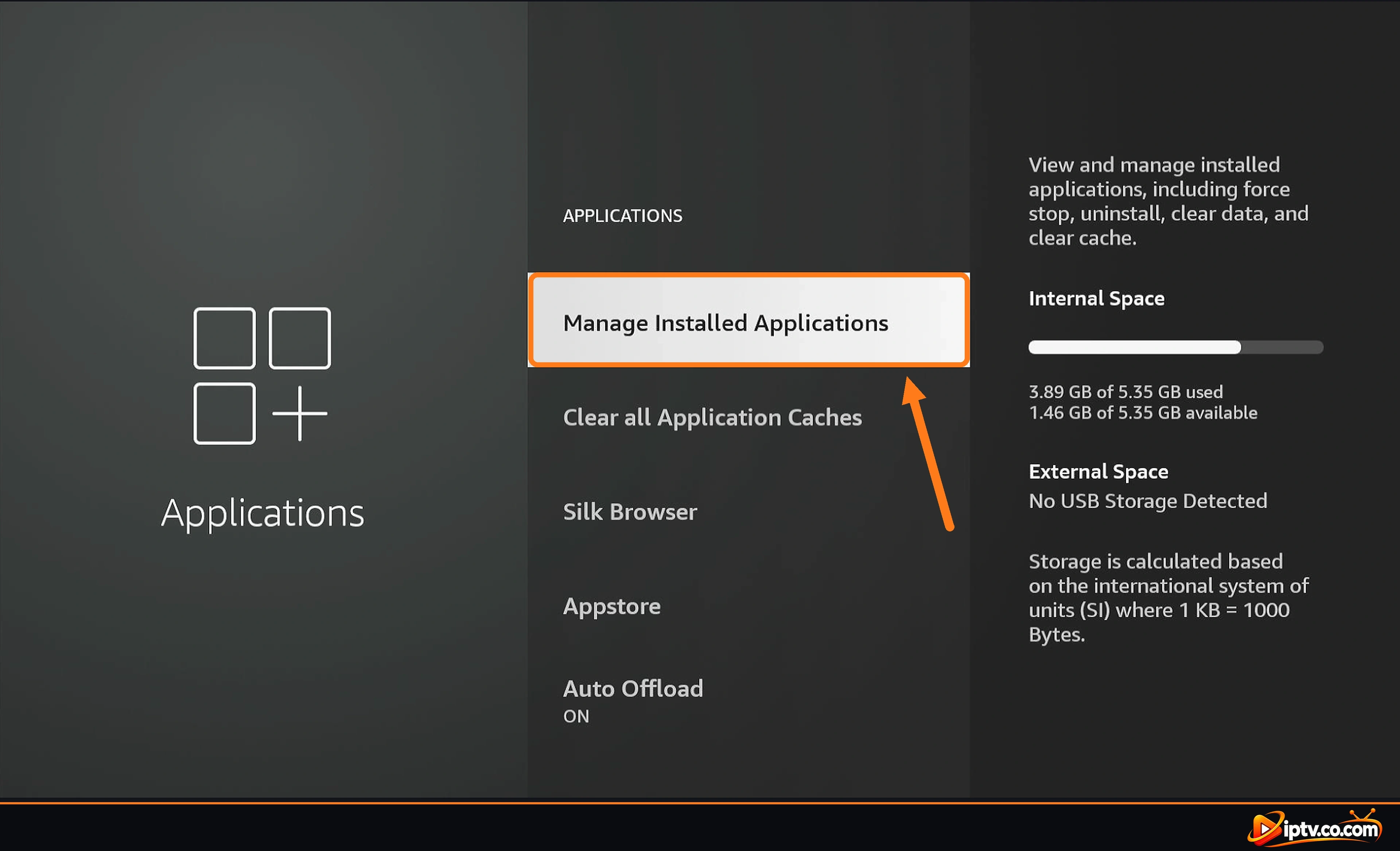
Step 2: Open Manage Installed Applications
Select Manage Installed Applications.
Open Manage Installed Applications
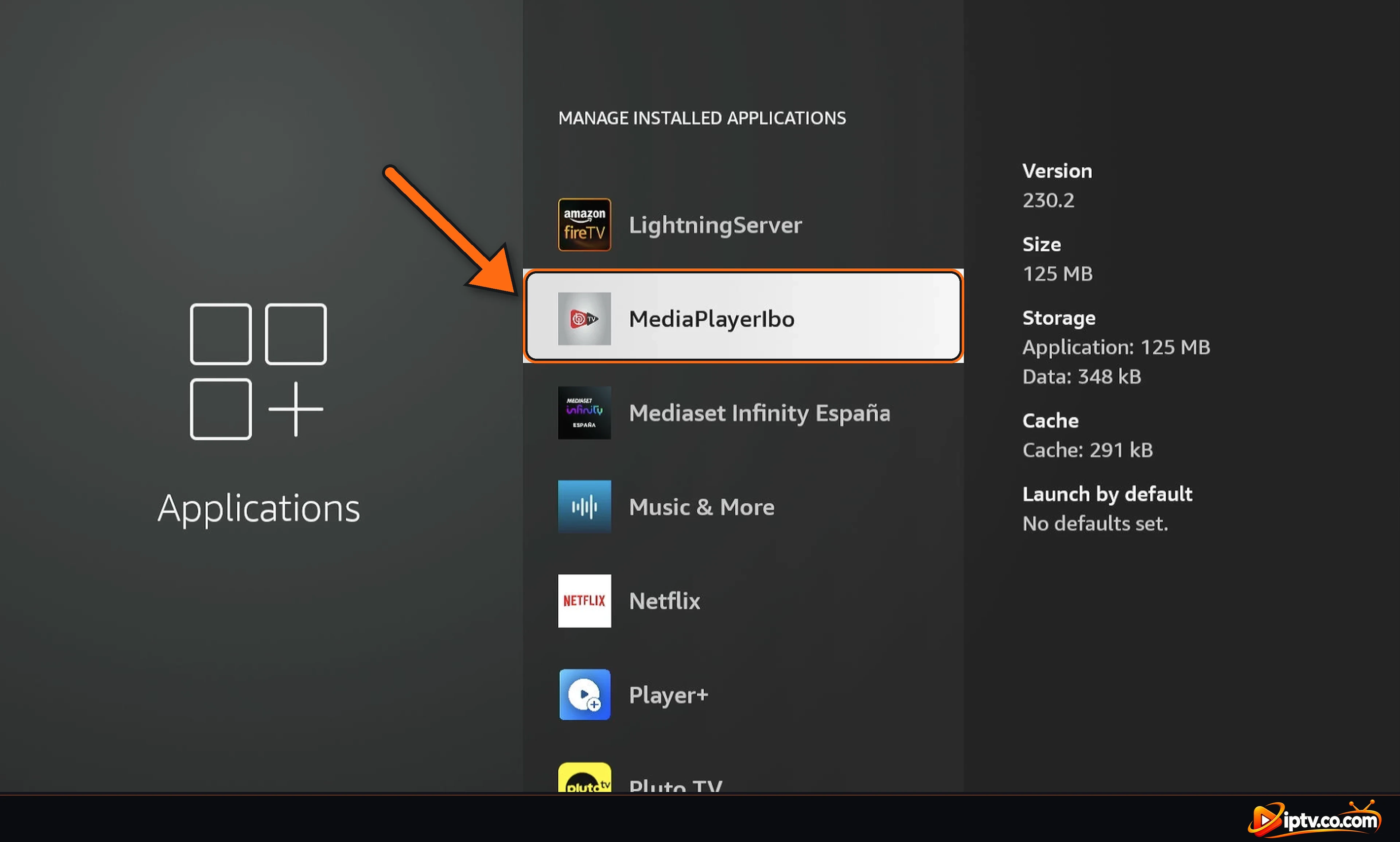
Step 3: Select MediaPlayerIbo
On Firestick, IBO Player is listed as MediaPlayerIbo. Select it.
Select MediaPlayerIbo in Manage Installed Applications
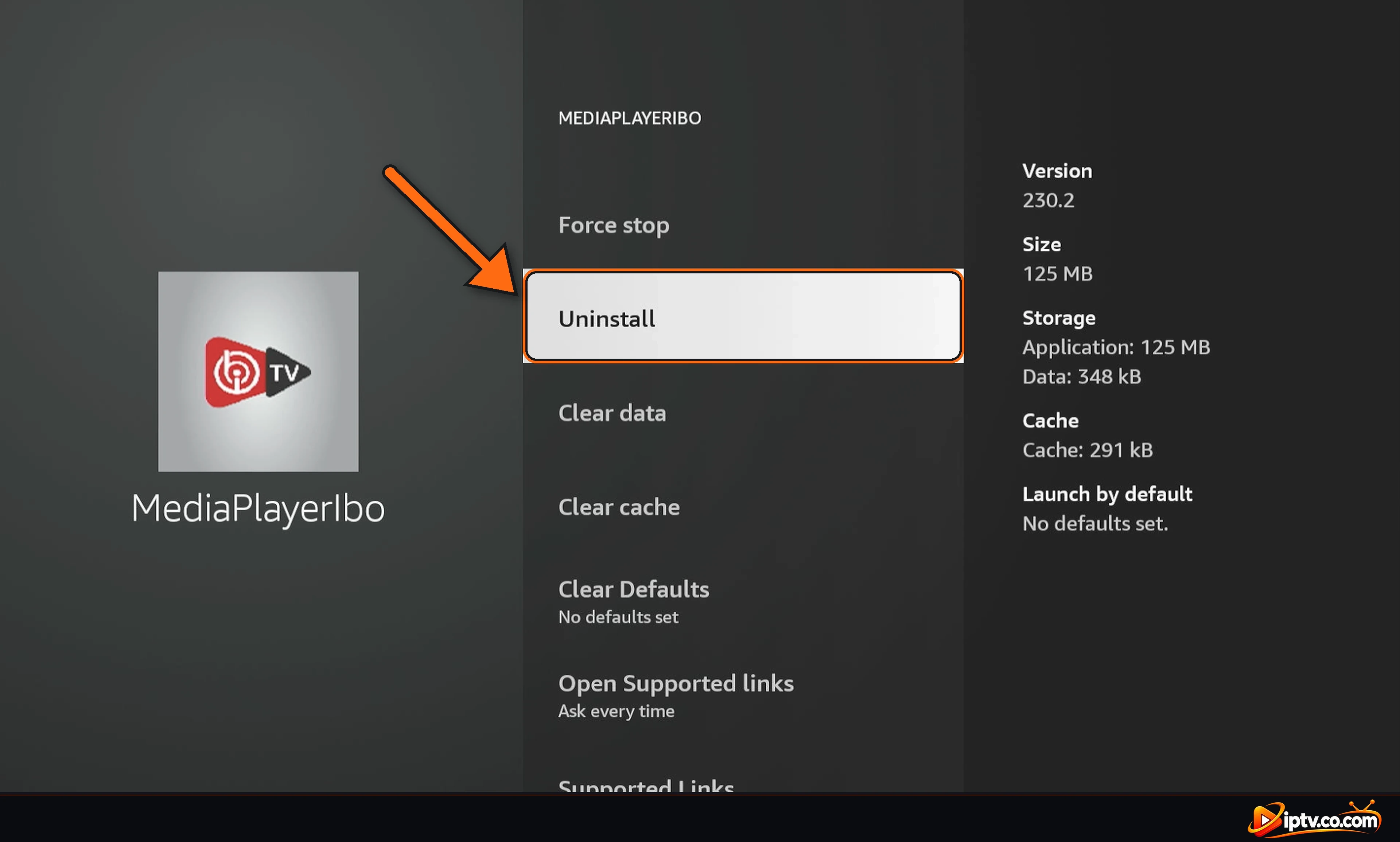
Step 4: Select Uninstall
Select Uninstall, then confirm.
Select Uninstall
Step 5: Install IBO Player Again
Restart the Firestick, then install IBO Player again with the Downloader code 511693 (see how to download IBO Player on Firestick). Open it and select Refresh: your playlist loads again.
On other devices: on Samsung and LG TVs, delete the app and reinstall it from the TV’s app store; on Android, go to Settings > Apps > IBO Player > Uninstall, then download it again.
Go to Settings > More Options, enable Use Runtime Function In Movies Section and Use Runtime Function In Series Section, and select Save. After that, movies and series should play.
Select Refresh on the home screen, clear the cache in Settings, restart the device and check your internet. If it still doesn’t load, check your playlist on the IBO Player website.
Usually the Xtream Codes or M3U URL was typed wrong, or the IPTV subscription expired. Add the playlist again on the website, or contact your IPTV provider.
Use exactly what your provider sent. Most IPTV servers work only with http://, so if your playlist doesn’t load and the URL or Host starts with https://, change it to http:// and save.
The website can’t match your Device ID and Device Key. Type the MAC address with the colons and the Device Key exactly as shown in the app, on the website shown in the app you use.
The free trial ended. Most IPTV providers activate IBO Player for free with a 6- or 12-month subscription, or you can buy the license on the official website.
Update the TV software, clear the app cache, and reinstall IBO Player from Samsung Apps. If it isn’t available for your model, use IBO Player Pro or a Firestick.