What Is SmartOne IPTV: Quick Answer
- SmartOne IPTV (also written Smart One IPTV) is an IPTV player app for Samsung, LG, Android TV and Google TV.
- It has no channels: you add your own M3U link or Xtream Codes on the SmartOne website with your TV’s MAC address.
- 15-day free trial, then €2.50 (about $3 USD) per year or €12.99 (about $15 USD) lifetime per TV.
- Not available on Firestick, phones, iPhone, PC, Mac or Roku.
Good to Know: Hot Player Has No Channels of Its Own
Hot Player is a media player only. It doesn’t provide any channels, playlists or subscriptions, so if your channels stop working, the problem is often your IPTV subscription or login details. Check them with your provider first.
What is SmartOne IPTV? SmartOne IPTV is a simple IPTV player made for smart TVs. It doesn’t sell channels or subscriptions: it plays the M3U playlist or Xtream Codes you get from your own IPTV provider. In this review of the SmartOne IPTV app, we explain how it works, which TVs support it, how much it costs, how you pay for it, and how it compares with other IPTV players for Samsung and LG TVs.
What Is SmartOne IPTV?
SmartOne IPTV (search names include Smart One IPTV, SmartOne-IPTV and SmartOne IPTV Player) is a media player for IPTV playlists. On Google Play it is published by Smart Cast. The app has a TV-friendly menu with Reload, Settings, Channels, Movies and Series.
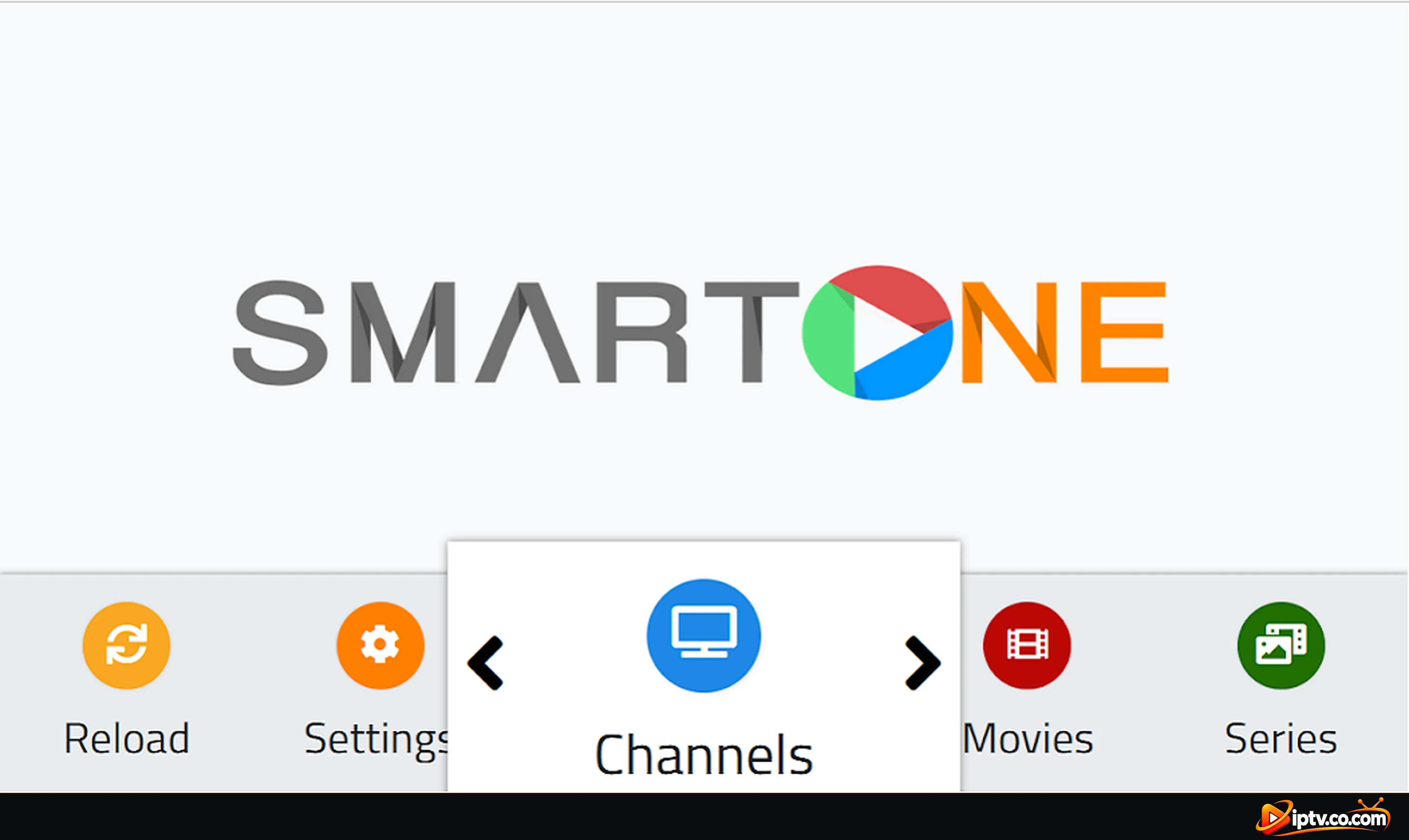
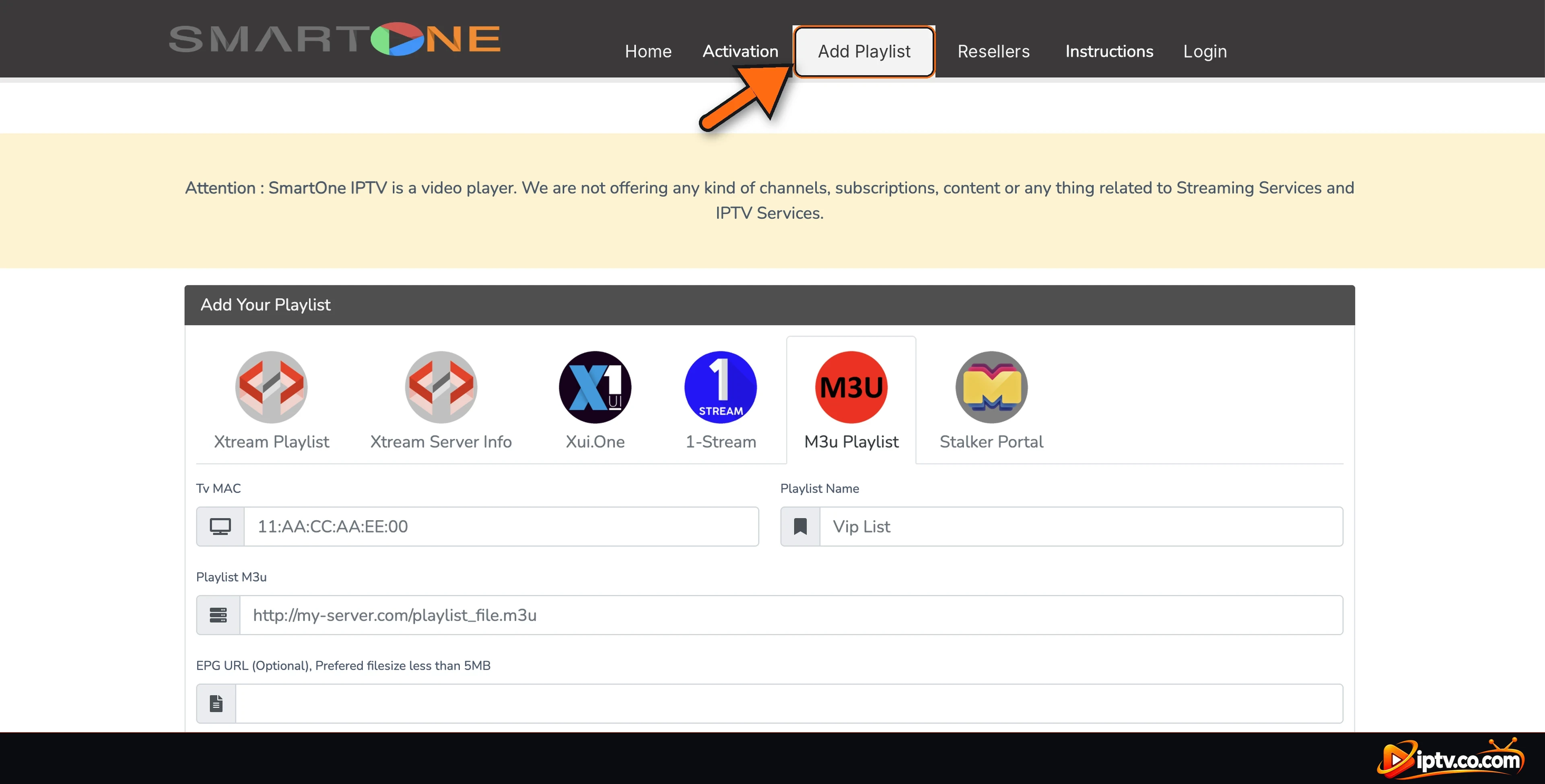
SmartOne supports six kinds of playlists: Xtream Playlist, Xtream Server Info (Xtream Codes), Xui.One, 1-Stream, M3U Playlist and Stalker Portal. It is not the same app as “Smart IPTV” (another, older player for smart TVs): the two have different websites and licenses.
How Does the SmartOne IPTV App Work?
SmartOne doesn’t use an account or a login screen on the TV. Your TV’s MAC address is its ID:
- Install SmartOne on your TV.
- Open Settings > Info and note the MAC address.
- On the SmartOne website (from a phone or computer), open Add Playlist, enter the MAC and your M3U URL or Xtream Codes.
- On the TV, select Reload: Channels, Movies and Series fill up.
Full steps with screenshots: how to activate SmartOne IPTV.
Which Devices Support SmartOne IPTV?
| Device | SmartOne? | What to use |
|---|---|---|
| Samsung smart TV | Yes | Samsung Apps |
| LG smart TV | Yes | LG Content Store |
| Android TV & Google TV | Yes | Google Play Store |
| Amazon Firestick | No | IBO Player or Hot Player |
| Roku | No | Hot Player |
| Android phone, iPhone, iPad | No | IBO Player or IPTV Smarters Pro |
| Windows PC & Mac | No | IPTV Smarters Pro |
Install steps for each TV: how to install SmartOne IPTV.
Is SmartOne a Good IPTV Player for Samsung TV?
Yes. SmartOne is one of the easiest IPTV apps for Samsung TV and LG TV: it installs from the TV’s own app store, the menu is clean, and the license is cheap. Because your playlist is added on a website, you never have to type long URLs with the TV remote. Other popular IPTV players for Samsung smart TVs work the same way with a MAC address:
- IBO Player: also on Firestick, phones, iPhone and PC.
- Hot Player: 30-day trial and also on Roku.
- BOB Player: Device ID and Key system.
- Smart STB: for Stalker portal (MAC) subscriptions.
How Much Does SmartOne IPTV Cost and How Do You Pay?
Every TV gets a 15-day free trial. After that, SmartOne needs a license for each TV: 1 year for €2.50 (about $3 USD) or Lifetime for €12.99 (about $15 USD, one-time payment). The license only unlocks the player, not channels.
How do you pay for SmartOne IPTV? On the SmartOne website, open Activation, type your TV’s MAC, choose Lifetime or 1 year, tick the agreement and select Make payment, then pay online at checkout. Restart the app and check Settings > Info > Expiration.

Payments are not refunded, so test your playlist during the trial first. Details: SmartOne IPTV subscription and price.
SmartOne IPTV Review: Pros and Cons
Pros
- Very easy to set up: the playlist is added from a phone or computer.
- Cheap: €2.50 per year or €12.99 lifetime.
- Supports M3U, Xtream Codes, Xui.One and Stalker portals.
- Clean, simple menu made for the TV remote.
Cons
- Smart TVs only: no Firestick, phone, iPhone, PC or Roku app.
- Fewer features than advanced players (no multi-screen or recording).
- No refunds after payment.
- One license per TV.
Is SmartOne IPTV Free, Safe and Legal?
SmartOne is free for 15 days, then it needs a paid license. It is safe when you install it from Samsung Apps, the LG Content Store or Google Play. Avoid “free activation” generators and modified APKs: they are fake or unsafe. SmartOne is a legal media player; only use playlists from IPTV providers that have the rights to their channels.
SmartOne IPTV Not Working?
Most problems are fixed quickly: select Reload, use http:// instead of https:// in your playlist, and check that the MAC on the website matches Settings > Info. Stopped after 15 days? The trial ended. All fixes: SmartOne IPTV not working.
Our Verdict: Should You Use SmartOne IPTV?
If you have a Samsung, LG or Android TV and want a simple, cheap IPTV player, SmartOne is a very good choice. Use the 15-day trial to test your playlist, then buy the lifetime license if you keep your TV for years. If you need the same app on Firestick, phones or a computer too, choose IBO Player or IPTV Smarters Pro instead.
Frequently Asked Questions
What is SmartOne IPTV?
SmartOne IPTV is an IPTV player app for Samsung, LG, Android TV and Google TV. It plays your own M3U playlist or Xtream Codes; it has no channels.
Is Smart One IPTV the same as SmartOne IPTV?
Yes. Smart One IPTV, SmartOne IPTV and SmartOne IPTV Player are the same app. It is not the same as the older Smart IPTV app.
Does SmartOne IPTV include channels?
No. SmartOne is only a player. You need an M3U link or Xtream Codes from an IPTV provider.
How much does SmartOne IPTV cost?
After a 15-day free trial, a license costs €2.50 (about $3 USD) for 1 year or €12.99 (about $15 USD) for lifetime, per TV.
How do you pay for SmartOne IPTV?
On the Activation page of the SmartOne website: enter your TV MAC, choose Lifetime or 1 year, tick the agreement, select Make payment and pay online.
Is there a SmartOne IPTV login?
No account is needed. Your TV’s MAC address is its ID, and your IPTV login (Xtream Codes or M3U) is added on the SmartOne website.
Is SmartOne IPTV available on Firestick, iPhone or Roku?
No. SmartOne works only on Samsung, LG, Android TV and Google TV. Use IBO Player on Firestick and iPhone, or Hot Player on Roku.
Is SmartOne good for Samsung TV?
Yes. It installs from Samsung Apps, is easy to set up from your phone and costs little. IBO Player and Hot Player are good alternatives.
Is SmartOne IPTV safe?
Yes, from Samsung Apps, the LG Content Store or Google Play. Avoid free activation generators and modified APKs.
Can I get a refund for SmartOne?
No. SmartOne payments are not refunded, so test the app with your playlist during the 15-day trial.