What Is GSE Smart IPTV: Quick Answer
- GSE Smart IPTV (also called GSE IPTV) is an advanced IPTV player by droidvision / GSE Technology Ltd.
- It plays your own M3U, JSON and Xtream Codes playlists. It has no channels.
- Free on Android and Firestick; GSE SMART IPTV PRO is a paid app on iPhone, iPad, Apple TV and Mac.
- The iPhone and iPad version supports Chromecast, AirPlay and recording.
Good to Know: Hot Player Has No Channels of Its Own
Hot Player is a media player only. It doesn’t provide any channels, playlists or subscriptions, so if your channels stop working, the problem is often your IPTV subscription or login details. Check them with your provider first.
What is GSE Smart IPTV? GSE Smart IPTV is one of the oldest and most complete IPTV player apps. It doesn’t sell channels: it plays the M3U link or Xtream Codes you get from your own IPTV provider, with Live TV, movies, series, a TV guide and favourites. In this review we explain the free, Lite and Pro versions, which devices support GSE IPTV, how casting works, what it costs, and whether it is the right player for you.
What Is GSE Smart IPTV?
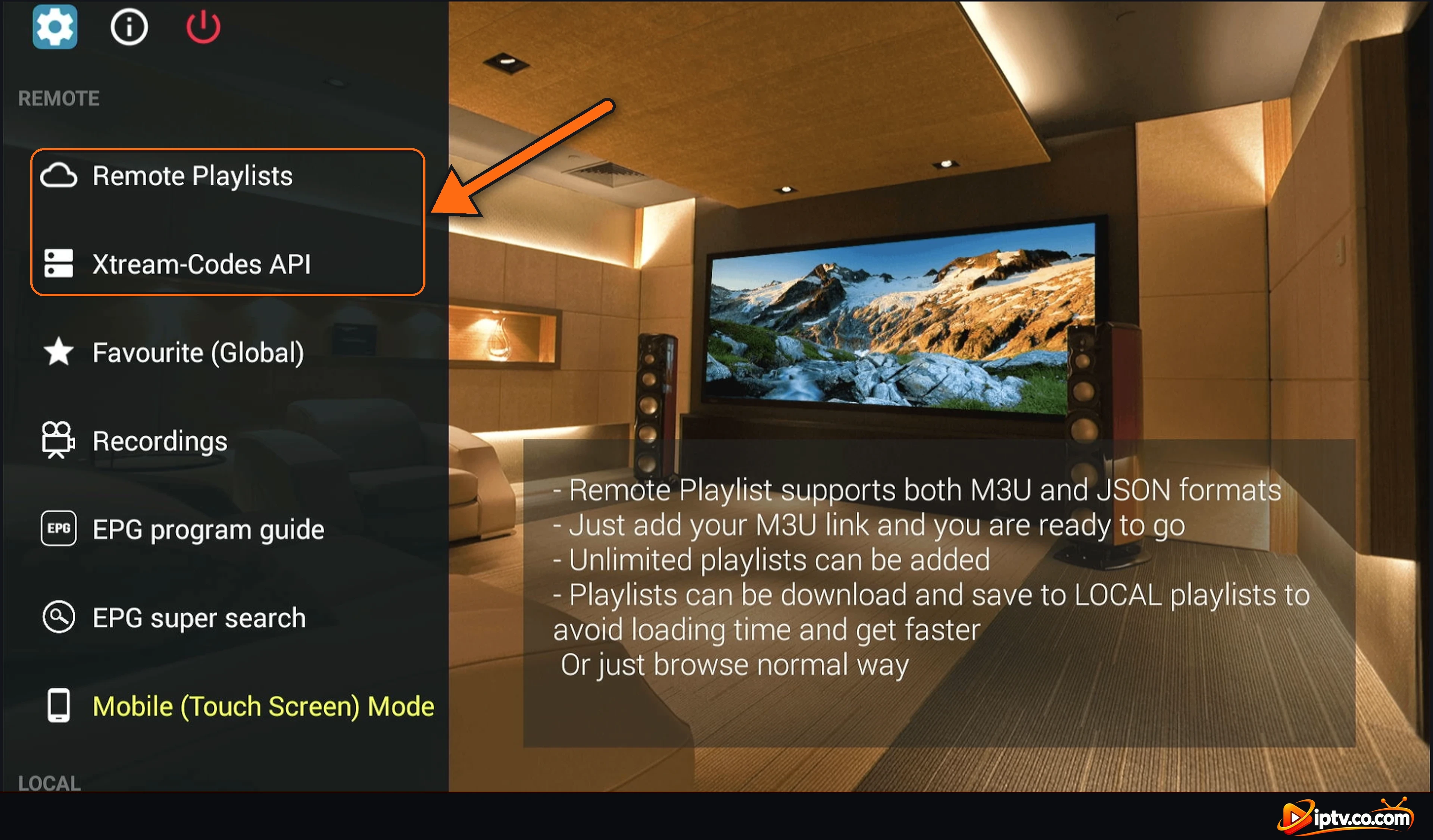
GSE Smart IPTV is a user-defined IPTV player for live and on-demand streams. You add your playlist in Remote Playlists (M3U or JSON link) or in Xtream-Codes API (server, username and password), and the app shows LIVE, VOD and TV SERIES, with an Electronic Program Guide and catch-up when your provider supports it.
It is made by droidvision / GSE Technology Ltd. Some other apps use “GSE” in their name, so check the developer before you install.
GSE Smart IPTV vs GSE Smart IPTV Pro vs Lite
| Version | Devices | Price |
|---|---|---|
| GSE Smart IPTV | Firestick, Android TV, Android phones | Free |
| GSE SMART IPTV PRO | iPhone & iPad | Paid (about $2.99 in the US) |
| GSE SMART IPTV PRO | Apple TV (tvOS 12 or later) | Paid (price varies by country) |
| GSE SMART IPTV LITE / PRO | Mac | Lite free, Pro paid (about $5.99) |
The Pro versions add features such as live TV recording, Chromecast and AirPlay on iPhone and iPad, and a web interface to manage playlists. Install steps: how to install GSE Smart IPTV.
How Does GSE IPTV Work?
- Install GSE Smart IPTV (Downloader code 354615 on Firestick).
- Open Xtream-Codes API or Remote Playlists and long-press +.
- Enter your Xtream Codes or paste your M3U link, then select ADD.
- Open the playlist: LIVE, VOD and TV SERIES load.

Every step with screenshots: how to activate GSE Smart IPTV.
Does GSE Smart IPTV Support Chromecast and AirPlay?
Yes. GSE SMART IPTV PRO for iPhone and iPad lists Chromecast support and AirPlay full-screen output. Connect your phone and Chromecast (or Apple TV) to the same Wi-Fi, play a channel and tap the cast or AirPlay icon in the player. On Android, if your version has no cast icon, use your phone’s screen cast option. If you watch on a Chromecast with Google TV, it is easier to install GSE Smart IPTV directly from Google Play on the TV.
Which Devices Support GSE Smart IPTV?
| Device | GSE? | How to get it |
|---|---|---|
| Amazon Firestick | Yes | Downloader code 354615 |
| Android TV & Google TV | Yes | Google Play |
| Android phone & tablet | Yes | Google Play |
| iPhone, iPad & Apple TV | Yes | App Store (GSE SMART IPTV PRO) |
| Mac | Yes | Mac App Store |
| Samsung, LG, Roku & Windows | No | Hot Player or IBO Player |
Is GSE Smart IPTV Free, Safe and Legal?
The Android and Firestick app is free; the Apple versions are low-cost paid apps. GSE Smart IPTV is safe from Google Play, the App Store or Downloader code 354615. Avoid “GSE Pro mod APK” or cracked versions: they can contain malware. GSE is a legal media player and includes no content; only use playlists from IPTV providers that have the rights to their channels.
Is GSE IPTV the Same as IPTV Smarters?
No. They are different apps from different developers. Both play M3U and Xtream Codes, but GSE Smart IPTV has more advanced options (recording, EPG time shift, parental control), while IPTV Smarters Pro is simpler for beginners. Some look-alike apps combine both names, so always check the developer.
GSE Smart IPTV Not Working?
Close the app and open the playlist again, use http:// instead of https://, and check your username and password. LIVE and VOD showing 0 usually means a login or subscription problem. All fixes: GSE Smart IPTV not working.
Our Verdict: Is GSE Smart IPTV Good?
GSE Smart IPTV is a powerful, free player on Firestick and Android, and one of the few IPTV players with a dedicated Apple TV app. It suits users who want advanced options and casting from iPhone. Beginners on Firestick may prefer TiviMate or IPTV Smarters Pro for a simpler menu.
Frequently Asked Questions
What is GSE Smart IPTV?
GSE Smart IPTV is an IPTV player app by droidvision for M3U, JSON and Xtream Codes playlists. It has no channels: you add your own playlist from an IPTV provider.
What is GSE Smart IPTV Pro?
GSE SMART IPTV PRO is the paid version for iPhone, iPad, Apple TV and Mac, with extras such as recording, Chromecast and AirPlay on iPhone and iPad.
Is GSE Smart IPTV free?
Yes on Android and Firestick. The iPhone, iPad and Apple TV Pro apps are paid, about $2.99 on iPhone in the US.
Is GSE Smart IPTV available on iPhone?
Yes. Get GSE SMART IPTV PRO by droidvision from the App Store on iPhone and iPad.
Is GSE Smart IPTV available on Apple TV?
Yes. GSE SMART IPTV PRO has an Apple TV app in the App Store (tvOS 12 or later).
Does GSE IPTV work with Chromecast?
Yes. The iPhone and iPad Pro app supports Chromecast and AirPlay: play a channel and tap the cast icon.
Is GSE Smart IPTV on Firestick?
Yes. Install it with the Downloader app and code 354615.
Is GSE Smart IPTV available on Samsung, LG or Roku?
No. Use Hot Player, IBO Player or SmartOne IPTV on those TVs.
Does GSE Smart IPTV include channels?
No. You need an M3U link or Xtream Codes from an IPTV provider.
Is GSE IPTV the same as IPTV Smarters?
No. They are different apps from different developers that both play M3U and Xtream Codes playlists.