Can you get IPTV on Roku? Yes, but not every app works there. Roku devices and Roku TVs can only install apps from the Roku Streaming Store (the Channel Store), and most popular IPTV players, like IPTV Smarters Pro, TiviMate and Televizo, are not in it. This page shows which IPTV players work on Roku, how to install them step by step, how to mirror an IPTV app from your phone or PC, and the easiest alternative when your favorite app isn’t available.
IPTV Players That Work on Roku
These IPTV players are in the Roku Streaming Store. Click a card to open its Roku install guide.
Which IPTV Apps Work on Roku?
Roku uses its own system (Roku OS), not Android, so it can’t install APK files, Downloader or apps from Google Play. Only apps approved for the Roku Streaming Store work, and the list changes from time to time.
| IPTV app | On Roku? | Where | Guide |
|---|---|---|---|
| Hot Player | Yes | Roku Streaming Store | Install guide |
| IBO Player / IBO Player Pro | In some countries | Roku Streaming Store | See below |
| IPTV Smarters Pro | No | Not available | Alternatives |
| TiviMate | No | Android only | TiviMate guide |
| Televizo | No | Android only | Televizo guide |
| OTT Navigator | No | Android only | OTT Navigator guide |
| BOB Player | No | Not available | BOB Player guide |
| Smart STB | No | Not available | Smart STB guide |
| GSE Smart IPTV | No | Not available | GSE guide |
How to Install Hot Player on Roku
- Press Home on your Roku remote and open the Streaming Store (Streaming Channels).
- Search for Hot Player.
- Select Hot Player by DIGI VIBES SARL and choose Add app.
- Open it and note the MAC address and Device Key shown on screen.
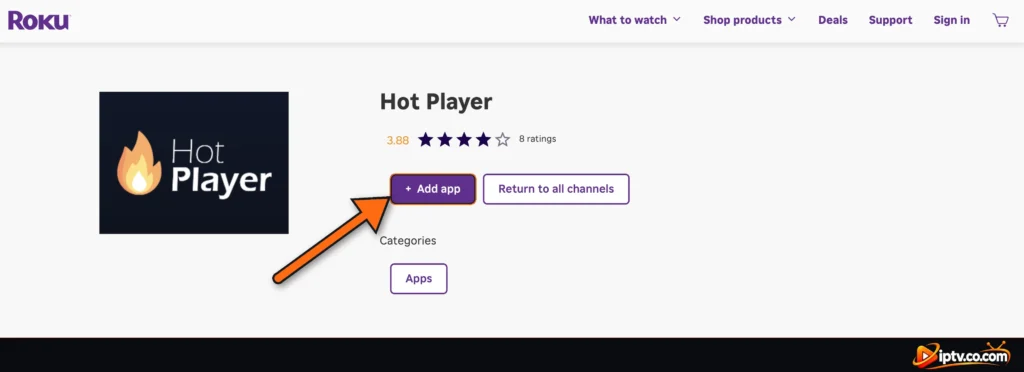
You can also add it from the Roku website on your phone or computer: sign in with your Roku account and select + Add app. Then add your playlist and activate Hot Player. Many IPTV providers activate Hot Player for free with a 6 or 12-month subscription. Full guide: install Hot Player on Roku.
IBO Player on Roku
In some countries, IBO Player or IBO Player Pro is listed in the Roku Streaming Store. Search for it the same way and select Add app. If it’s there, it works like on other TVs: note the Device ID and Device Key, add your playlist on the IBO Player website and activate IBO Player. If it isn’t listed in your country, use Hot Player or one of the options below.
Can You Install IPTV Smarters Pro on Roku?
No. IPTV Smarters Pro is not available on Roku, and there is no APK for Roku. Many people search for “Roku Smarters Player”: if you see a channel with a similar name, check the developer before you add it, because it is not the official IPTV Smarters app. To use IPTV Smarters with a Roku TV, you have two options: mirror it from your phone, or plug in a Firestick or Google TV stick (see below). The same goes for TiviMate and Televizo, which only run on Android.
How to Watch IPTV on Roku With Screen Mirroring
You can run any IPTV app on your phone or PC and show it on the Roku:
- On the Roku, go to Settings > System > Screen mirroring and set the mode to Prompt or Always allow.
- Android phone: open the quick settings panel, tap Smart View, Cast or Screen mirroring (the name depends on the phone) and choose your Roku.
- Windows PC: press Windows + K and select your Roku.
- iPhone, iPad or Mac: many recent Roku models support AirPlay. Open Control Center, tap Screen Mirroring and choose the Roku.
- Open your IPTV app (for example IPTV Smarters Pro) and play a channel.
Mirroring is fine for a match or a movie, but the picture depends on your Wi-Fi and your phone must stay on. For everyday viewing, a real IPTV app on the TV is better.
The Best Way to Get Any IPTV App on a Roku TV
A Roku TV still has normal HDMI ports. Plug an Amazon Firestick or a Google TV stick into a free HDMI port and switch the input. You can then install IPTV Smarters Pro, TiviMate, IBO Player, Televizo and every other IPTV player in a few minutes. Step-by-step guides: IPTV on Firestick and IPTV on Google TV.
Can Roku Play an M3U Playlist?
Roku has no built-in M3U player. Some M3U playlist player apps appear in the Roku Streaming Store, but they come and go, are often basic and rarely support Xtream Codes or a TV guide. If you only have an M3U link, Hot Player is the easier choice on Roku: you add the M3U link on its website with your MAC address. Need your link? See how to get an M3U URL.
How to Set Up IPTV on Roku
An IPTV app has no channels. After installing it, add the login from your IPTV provider:
- Xtream Codes (recommended): a username, password and server URL. Movies, series and the TV guide load better. Don’t have one? See how to get Xtream Codes.
- M3U playlist: one long link. Copy it on your Roku and paste it in the app. See how to get an M3U URL.
IBO Player, BOB Player, Hot Player and SET IPTV show a Device ID (MAC address) and Device Key: you add your playlist on the app’s website, then restart the app. Activation guides: IPTV Smarters, IBO Player, SET IPTV, OTT Navigator.
Is IPTV Free on Roku?
The IPTV player apps are free to install, with a free trial and then an activation (often free from your provider). The app has no channels: you still need an IPTV subscription from a provider, and many offer a free trial. Roku also includes free live TV in The Roku Channel, but that is Roku’s own service, not IPTV. “Free IPTV Roku codes” no longer work: Roku stopped supporting private channel codes, so avoid websites that promise them.
IPTV Not Working on Roku? Quick Fixes
- App not in the store: availability depends on your country and Roku model. Update the Roku in Settings > System > System update and search again.
- “Your MAC address is not associated with any playlist”: add your playlist on the app’s website with the exact MAC address on screen, then restart the app. See Hot Player not working.
- Restart the Roku: Settings > System > Power > System restart.
- Remove and add the app again: highlight it, press * and select Remove, then add it from the Streaming Store.
- Mirroring stutters: move the phone closer to the router or use the 5 GHz Wi-Fi.
- VPN: Roku has no VPN app, so use your provider’s VPN DNS (for example
http://vpn.dream-4k.co) as the server URL.
Frequently Asked Questions
Can I get IPTV on my Roku TV?
Yes. Install Hot Player (or IBO Player where available) from the Roku Streaming Store and add your playlist, mirror an IPTV app from your phone, or plug a Firestick or Google TV stick into the TV.
Does IPTV Smarters Pro work on Roku?
No. IPTV Smarters Pro is not available in the Roku Streaming Store and Roku can’t install APK files. Mirror it from your phone or use a Firestick or Google TV device.
What is the best IPTV player for Roku?
Hot Player is the most reliable IPTV player in the Roku Streaming Store. In some countries IBO Player is also available.
Can I install TiviMate or Televizo on Roku?
No. TiviMate and Televizo only run on Android devices. Use a Firestick or Google TV stick on your Roku TV’s HDMI port.
How do I add IPTV to my Roku?
Open the Streaming Store, add Hot Player, note the MAC address and Device Key, then add your M3U or Xtream Codes playlist on the Hot Player website and restart the app.
Can I install an IPTV APK on Roku?
No. Roku uses its own system and can only install apps from the Roku Streaming Store. APK files and Downloader don’t work on Roku.
Can I cast IPTV to Roku?
Yes. Turn on screen mirroring on the Roku, then mirror your Android phone, Windows PC or (on supported models) iPhone with AirPlay while the IPTV app plays.
Does IPTV work on a Roku stick?
Yes, the same way as on a Roku TV: use Hot Player from the Streaming Store or screen mirroring.
Is IPTV free on Roku?
The player apps are free to install, but you need an IPTV subscription for channels. Free IPTV Roku codes no longer work.
Why does Roku block IPTV apps?
Roku only allows apps approved for its Streaming Store and has removed many IPTV players. That is why Hot Player, mirroring or a Firestick are the main options.