Watching IPTV on a Windows PC or laptop is easy once you pick the right app. Some IPTV players, like IPTV Smarters Pro and IBO Player, have a real Windows version you install from an .exe file; others, like Hot Player and MyIPTV Player, are in the Microsoft Store; and VLC plays an M3U playlist with no extra app at all. This page compares the best IPTV player for Windows 10 and Windows 11, shows how to install each one step by step, and fixes the most common Windows IPTV problems.
Best IPTV Players for Windows PC
These IPTV players have a Windows version. Click a card to open its Windows install guide.
IPTV Smarters
Free player on almost every device, including iPhone, Apple TV, Windows and Mac.
- Firestick
- Android
- Samsung
- LG
- iPhone
- Apple TV
- Windows
- Mac
IBO Player
All-round player for smart TVs, Firestick, phones, Windows and Mac.
- Firestick
- Android
- Samsung
- LG
- iPhone
- Windows
- Mac
- Roku
Hot Player
One of the few IPTV players on Roku, plus Windows and Mac.
- Firestick
- Android
- Samsung
- LG
- Roku
- Windows
- Mac
IPTV Apps for Windows 10 and Windows 11 Compared
All of these work on Windows 10 and Windows 11, on desktops and laptops. Pick IPTV Smarters Pro for the easiest Xtream Codes login, IBO Player or Hot Player if your provider activates them for you, and VLC if you just want to test an M3U link quickly.
| IPTV player | Where to get it | Cost | Login | How to install |
|---|---|---|---|---|
| IPTV Smarters Pro | .exe from the official link | Free | Xtream Codes, M3U | Guide |
| IBO Player (IBO TV Player) | .exe from the official link | Free trial, then activation (often free from your provider) | Device ID + playlist | Guide |
| Hot Player | Microsoft Store | Free trial, then activation (often free from your provider) | Device ID + playlist | Guide |
| VLC media player | Official website or Microsoft Store | Free | M3U only, no TV guide | Steps below |
| MyIPTV Player | Microsoft Store | Free | M3U + EPG | Steps below |
| Kodi | Official website or Microsoft Store | Free | M3U + EPG (PVR IPTV Simple Client) | Steps below |
How to Install IPTV Smarters Pro on Windows 10 and 11
IPTV Smarters Pro has a free Windows version (about 130 MB):
- Open Chrome, Edge or Firefox and paste the official Windows download link from our IPTV Smarters Pro guide.
- Open the .exe file from your Downloads folder.
- If Windows protected your PC appears, click More info > Run anyway (only for the official file).
- Click through the installer and Finish.
- Open IPTV Smarters Pro from the Start menu and choose Login with Xtream Codes API.
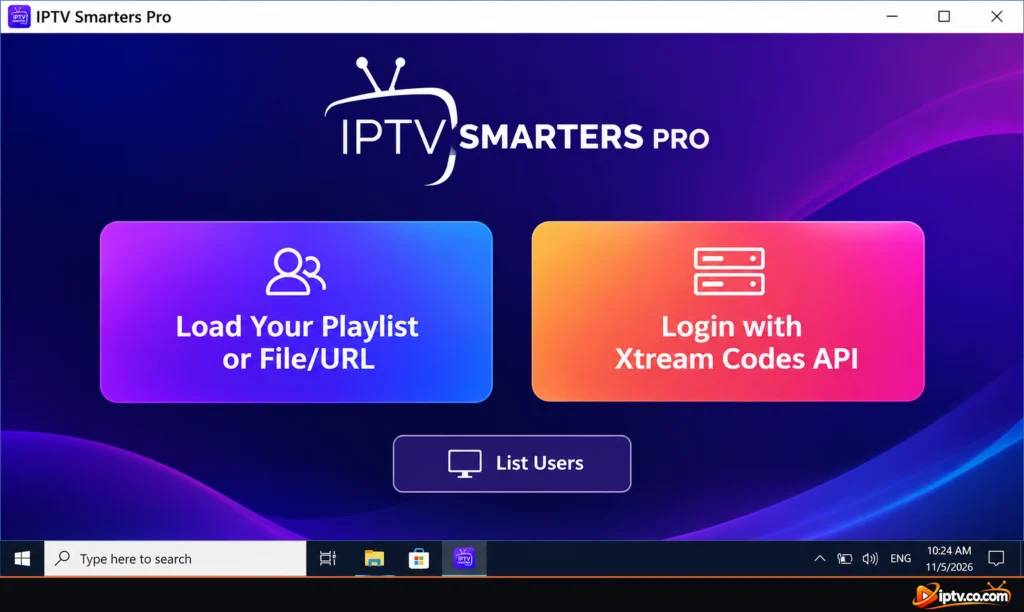
Looking for IPTV Smarters Lite (Smarters Player Lite) for Windows? Smarters Player Lite is made for phones, tablets and TVs; there is no Windows version. On a PC, use the free IPTV Smarters Pro for Windows above: it has the same login screens and works with the same Xtream Codes or M3U playlist.
How to Install IBO Player on Windows
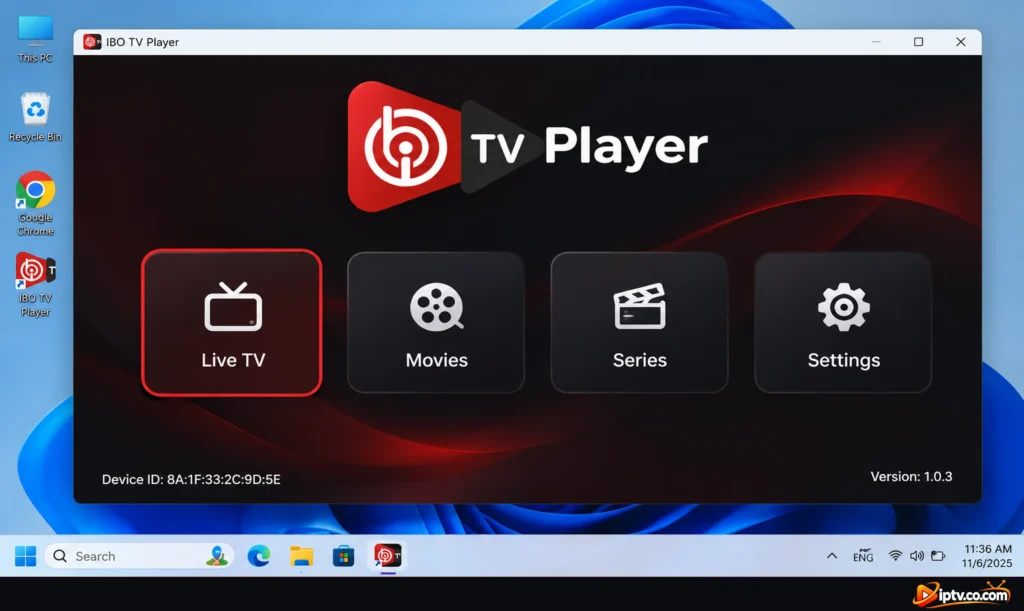
The Windows version of IBO Player is called IBO TV Player. Download the official ibo_installer.exe from the link in our IBO Player guide, run it, click Finish and open IBO TV Player. Your Device ID (MAC address) is shown at the bottom left: add your playlist with it on the IBO Player website, then activate IBO Player. BOB Player has no Windows version, so IBO Player is also the best choice for BOB Player users.
How to Install Hot Player on Windows
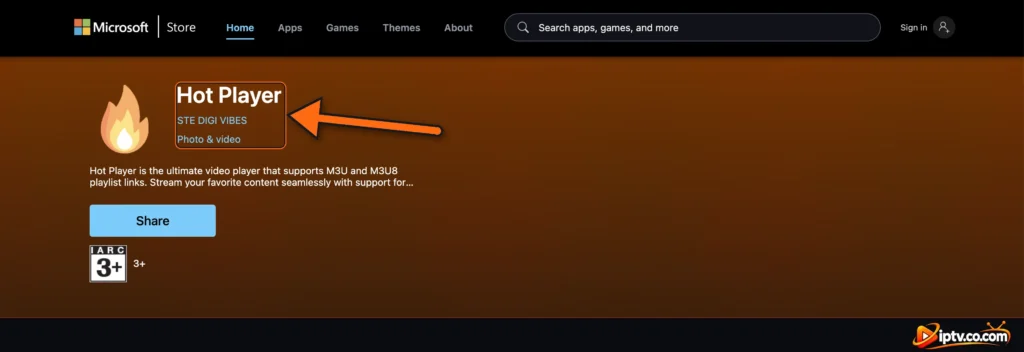
Open the Microsoft Store, search for Hot Player (by STE DIGI VIBES) and click Get or Install. Open it from the Start menu and note the Device ID to add your playlist. Full steps: install Hot Player on Windows.
How to Watch IPTV on Windows With VLC
VLC media player is free and plays an M3U playlist directly, so it is the fastest way to test your IPTV on Windows 10 or 11:
- Install VLC from its official website or the Microsoft Store and open it.
- Click Media > Open Network Stream (or press Ctrl + N).
- Paste your M3U URL and click Play.
- Press Ctrl + L to open the playlist and double-click a channel to change it.
You can also save the playlist as a .m3u file and open it with VLC. VLC has no TV guide and no Xtream Codes login, and very large playlists load slowly; for daily use, a real IPTV player is better. Windows Media Player is not a good IPTV player: most IPTV streams and playlists will not play in it.
How to Use MyIPTV Player on Windows
- Open the Microsoft Store, search for MyIPTV Player and click Get.
- Open it and go to Settings > Add new playlist and EPG source.
- Under Remote channel list, type a name, paste your M3U URL and click Add remote list. You can add an EPG (TV guide) link the same way.
- Back in Settings, select the playlist and click Refresh, then open Channels.
How to Watch IPTV on Kodi for Windows
- Install Kodi and open it.
- Go to Add-ons > Install from repository > PVR clients > PVR IPTV Simple Client and click Install.
- Open Configure, set Location to Remote path and paste your M3U URL (and your EPG URL in the EPG settings).
- Restart Kodi and open TV from the main menu.
Can You Use Android IPTV Apps on Windows?
TiviMate, Televizo, OTT Navigator, SET IPTV and BOB Player have no Windows version. Microsoft ended the Windows Subsystem for Android in March 2025, so the only way to run them on a PC is an Android emulator such as BlueStacks. It works, but it uses more memory and the picture is not as smooth as a native Windows app. If you just want IPTV on your computer, IPTV Smarters Pro, IBO Player or Hot Player are easier.
How to Set Up IPTV on Windows
An IPTV app has no channels. After installing it, add the login from your IPTV provider:
- Xtream Codes (recommended): a username, password and server URL. Movies, series and the TV guide load better. Don’t have one? See how to get Xtream Codes.
- M3U playlist: one long link. Copy it on your PC and paste it in the app. See how to get an M3U URL.
IBO Player, BOB Player, Hot Player and SET IPTV show a Device ID (MAC address) and Device Key: you add your playlist on the app’s website, then restart the app. Activation guides: IPTV Smarters, IBO Player, SET IPTV, OTT Navigator.
Best Free IPTV Players for Windows
IPTV Smarters Pro, VLC, MyIPTV Player and Kodi are free. IBO Player and Hot Player start with a free trial, then need an activation that many IPTV providers include for free with a 6 or 12-month subscription. Remember: the app is free, but it has no channels. You still need an IPTV subscription, and many providers offer a free trial.
IPTV Not Working on Windows? Quick Fixes
- “Windows protected your PC”: click More info > Run anyway, only for the official installers in our guides.
- Firewall: when Windows asks, click Allow access so the app can reach the IPTV server.
- Check the URL: most IPTV servers need http://, not https://, and the exact port your provider gave you.
- VLC not playing IPTV: update VLC to the latest version, test the M3U link again and try a smaller playlist.
- Buffering: use a network cable instead of Wi-Fi and close other downloads.
- Full screen or window mode: double-click the video (or press F or Esc, depending on the app) to switch between full screen and a window.
- VPN: set your provider’s VPN DNS (for example
http://vpn.dream-4k.co) as the server URL.
Full fixes: IPTV Smarters not working, IBO Player not working, Hot Player not working. Watching on a Mac too? See our Mac IPTV guide.
Frequently Asked Questions
What is the best IPTV player for Windows?
IPTV Smarters Pro is the best free choice for most people, with an easy Xtream Codes login. IBO Player and Hot Player are great if your provider activates them, and VLC is the quickest way to test an M3U link.
Is there a free IPTV player for Windows?
Yes. IPTV Smarters Pro, VLC, MyIPTV Player and Kodi are all free on Windows 10 and Windows 11.
How do I install IPTV Smarters Pro on Windows 10 or 11?
Download the official .exe from our guide, open it, click More info > Run anyway if Windows asks, finish the installer and log in with Xtream Codes API.
Is IPTV Smarters Lite available for Windows?
No. Smarters Player Lite is only for phones, tablets and TVs. On a PC, use the free IPTV Smarters Pro for Windows, which works with the same login.
How do I watch IPTV on Windows with VLC?
Open VLC, click Media > Open Network Stream (Ctrl + N), paste your M3U URL and click Play. Press Ctrl + L to see the channel list.
Can Windows Media Player play IPTV?
Not reliably. Most IPTV playlists and live streams do not play in Windows Media Player, so use VLC or an IPTV player instead.
Can I use TiviMate on Windows?
There is no Windows version of TiviMate. You can only run it in an Android emulator such as BlueStacks, which is slower than a native Windows IPTV player.
How do I set up IPTV on Windows?
Install an IPTV player, then log in with the Xtream Codes (username, password and server URL) or paste the M3U link from your IPTV provider.
Does an IPTV player for Windows include channels?
No. IPTV players have no channels. You need a subscription from an IPTV provider and add its login or playlist to the app.
Why is IPTV not working on my Windows PC?
Check that the server URL starts with http://, allow the app through the Windows firewall, try a network cable and update the app to the latest version.